
Never Miss a Call: A Setup Guide for Solo Businesses
Key takeaways
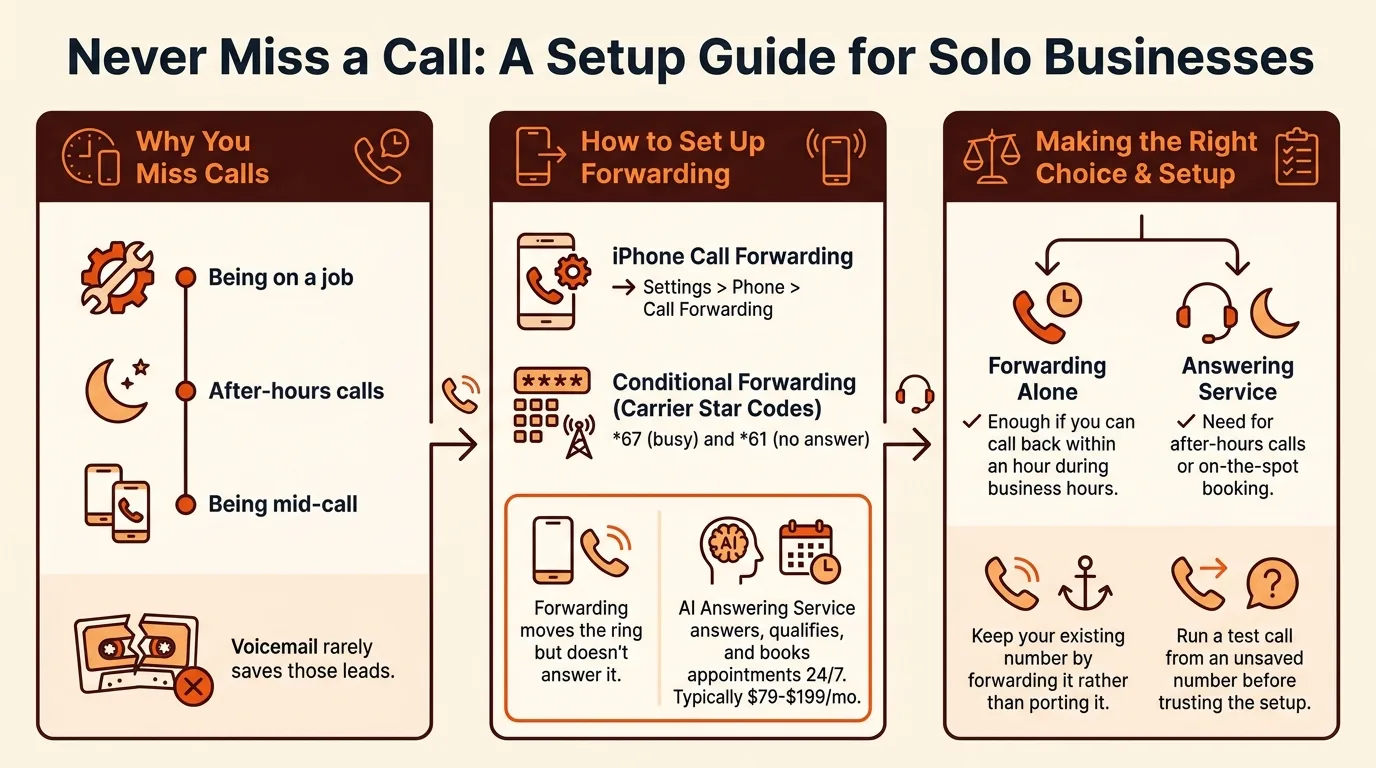
- Small businesses miss calls for three reasons: being on a job, after-hours calls, and being mid-call, and voicemail rarely saves those leads.
- iPhone call forwarding lives in Settings > Phone > Call Forwarding, and conditional forwarding uses carrier star codes like *67 (busy) and *61 (no answer).
- Forwarding moves the ring but doesn't answer it; an AI answering service answers, qualifies, and books appointments 24/7, typically $79-$199/mo.
- Forwarding alone is enough if you can call back within an hour during business hours; you need an answering service for after-hours calls or on-the-spot booking.
- Keep your existing number by forwarding it rather than porting it, and run a test call from an unsaved number before trusting the setup.
You can stop losing jobs to voicemail today and never miss a call: forward your iPhone to an answering service, or pair forwarding with an AI receptionist that answers and books appointments while you're under a sink or on a roof. This guide covers the Settings paths, carrier codes, and how to choose between forwarding, apps, and AI answering.
Why do small businesses miss calls in the first place?
You miss calls for three reasons: you're elbow-deep in a job with one hand, the phone rings at 9pm when you're home, or you're already talking to the customer before you. Each one costs the same thing: the caller hangs up and dials the next plumber on the list.
The three failure points: on a job, after hours, mid-call
On a job is the big one. You can't answer under a sink, and most solo owners don't have a second line to hand off to. After hours is the second: emergency calls come in nights and weekends, exactly when nobody picks up. Mid-call is the sneaky one: a customer calls while you're already on the phone, and there's no way to catch it.
Why voicemail is where leads go to die
Voicemail feels like a safety net, but callers in an emergency don't leave messages. They want a human or they move on. The fix is to catch the call at the moment it rings, whether that's forwarding your line (Apple documents the settings here: Set up call forwarding on iPhone) or letting an AI receptionist like Never Miss a Call — AI Answers Live | SaaSyVoice answer and book the job while you work.
How do I measure how many calls I'm currently missing?
Check your carrier and phone logs
Before spending a dollar, get your real missed-call number. On iPhone, open the Phone app, tap Recents, and scroll a week of history: every call you declined, let ring out, or sent to voicemail while on a job. Your carrier's online account page also lists call activity, including calls that rang but never connected. Count only the calls that could have been customers, not spam.
A simple one-week tracking method
For seven days, jot each missed call in a note: time, caller, and whether you called back. Two patterns will show up fast. Most misses happen during jobs or after hours, which is exactly where an AI receptionist earns its keep. If you find yourself losing three or four jobs a week to voicemail, a tool like Goodcall Alternative: AI Answering With Unlimited Agents | SaaSyVoice pays for itself on the first booked emergency call.
How do I set up call forwarding on iPhone so I never miss a phone call?
Forward all calls: Settings > Phone > Call Forwarding
Open Settings, tap Phone, then Call Forwarding, and flip the switch on. Enter the number you want calls sent to (your office line, a second phone, or your answering service) and tap back to save. From that moment, every incoming call rings that number instead of your iPhone, so a customer with a burst pipe reaches a live voice even while you're under a sink.
Conditional forwarding with carrier codes (busy, no answer, unreachable)
If you only want overflow covered, not every call, use your carrier's star codes from the keypad. Dial the code, then the forwarding number, then press call; dial the code alone to cancel. The codes vary by carrier, so check your carrier's own support pages first.
| Situation | Typical code (GSM/AT&T, T-Mobile) |
|---|---|
| Busy | *67 + number |
| No answer | *61 + number |
| Unreachable (off/dead zone) | *62 + number |
| Forward all | *72 + number (CDMA, Verizon) |
Do Not Disturb, Live Voicemail, and Silence Unknown Callers settings that matter
Three settings quietly eat your leads. Do Not Disturb sends callers straight to voicemail, so schedule it or leave it off during business hours. Silence Unknown Callers (Settings > Phone) sends any number not in your contacts to voicemail, which kills first-time customers. Live Voicemail is worth keeping on: you can read a transcription mid-call and grab the phone if it's an emergency.
Testing your setup before you trust it
Call yourself from a number not saved in your phone, from another phone, and with your line busy. Confirm each scenario rings the right destination and that voicemail never intercepts first. For a full walkthrough with screenshots and carrier-specific variations, see our guide at Call Forwarding Codes 2026: Route Calls to an AI Receptionist.
What does a never miss a call app actually do?
What forwarding alone can't do: answering, qualifying, booking
Forwarding solves one problem: the ring you can't answer gets moved somewhere else. It doesn't answer the call. If the forwarded line rings out or the caller hangs up at the beep, you've still lost the job, and you won't know a lead tried to reach you until you check voicemail hours later.
A never miss a call app goes three steps further. It answers every call immediately, in the caller's language. It qualifies the lead by asking what the job is, where, and how urgent, so a burst pipe gets flagged ahead of a quote request. And it books the appointment on your calendar, so the job is on the schedule before you've climbed down from the ladder. It also filters the spam calls that eat your day, and can warm transfer a real emergency to your cell.
Where AI answering services fit
This is the category SaaSyVoice sits in, alongside Goodcall, Smith.ai, Ruby Receptionists, Phone Stack, and Dialbox. You keep your number, forward missed and after-hours calls to your AI receptionist, and it answers, qualifies, and books 24/7. Setup takes about a minute from your website, with tiers from $79 to $199/mo and a free trial, no credit card. The same pattern works beyond trades: a career coach can run the same setup with an AI Phone Agent for Career Coaches | SaaSyVoice that screens inquiries and books sessions.
When is call forwarding enough vs. when do I need an answering service?
The decision framework: volume, hours, and booking needs
Forwarding wins when your problem is simple: you're on a job and can pick up on another phone within a minute or two. If most of your missed calls happen during business hours and you can call back the same hour, conditional forwarding plus Live Voicemail, which shows you a live transcript while the caller is still leaving a message, per Apple's own Live Voicemail and Focus documentation for iOS, costs you nothing extra and catches a lot of jobs on its own. You need an answering service when any of these are true: calls come in after 6pm, you can't answer mid-repair (wiring a panel, under a sink), or callers expect to book an appointment on the spot instead of leaving a message. An emergency call at 9pm is exactly the job a plumber wants, and voicemail loses it every time.
How the main options compare, including where SaaSyVoice falls short
Forwarding and voicemail transcription are free but put the work back on you: you still call back, qualify, and schedule by hand. Human services like Ruby Receptionists and Smith.ai handle judgment-heavy calls well but sit at the top of the budget. AI options like Dialbox and SaaSyVoice answer instantly around the clock and book appointments, at $79-$199/mo for SaaSyVoice (AI Answering Service for Small Business | SaaSyVoice). Where SaaSyVoice falls short: it's built for booking and lead qualification, not nuanced calls like "I'm disputing this invoice," where a human receptionist still does better.

How do I make sure after-hours calls are captured?
After-hours capture comes down to two settings: a schedule that forwards calls automatically when you close, and a script that sorts the emergency caller from the one who can wait until Tuesday.
Time-based routing with carrier codes
Most US carriers support conditional forwarding codes that activate only when you don't pick up or you're already on a call. The FCC explains these conditional call forwarding codes like *71 (busy) and *72 (all calls), and your carrier's support page lists the exact dial strings. Set the busy and no-answer variants during work hours, then switch to unconditional forwarding at quitting time so every evening call routes to your answering service instead of voicemail.
Emergency vs. routine calls: qualifying the caller
An AI receptionist should ask two questions before anything else: is water, gas, or power actively causing damage, and when do you need someone there? A burst pipe at 11pm gets booked or warm-transferred to your cell; a dripping faucet gets a morning slot. SaaSyVoice does this qualification on every call, though like any AI it can misjudge urgency on an ambiguous call, so keep the warm transfer to your own number as the backstop for anything flagged as an emergency.
What's the fastest way to set up a never-miss-a-call workflow today?
The 60-minute setup checklist
Start the timer. First 10 minutes: count your missed calls from the last week in your phone log so you know your baseline. Next 10: turn on conditional forwarding on your iPhone so unanswered calls route somewhere instead of dying in voicemail. Then 15 minutes: set up an answering service that books appointments, not one that just takes messages. SaaSyVoice builds yours from your website in about a minute, and the free trial needs no credit card. Spend the last 20 minutes on the details that matter: add your after-hours emergency wording, set your calendar so it can book appointments, and run one test call to confirm the whole path works.
Keeping your existing number
You keep your number. Forward it, don't port it. Your customers already have it saved, your truck magnets have it printed, and forwarding means nothing changes on their end. Set it once, check the test call, and every missed call from tonight onward gets answered and booked while you're on the job.
FAQ
Does call forwarding cost extra on iPhone?
The forwarding feature itself is free and built into iOS, but your carrier may charge per-minute forwarding rates or require the feature enabled on your account, so check with them first. Conditional forwarding with star codes works the same way. Compare that cost to one booked emergency job and it usually pays for itself quickly.
Can I keep my existing business phone number if I use an AI answering service?
Yes, and you should keep it. Forward your existing number to the answering service rather than porting it, so nothing changes for customers who already have it saved or see it on your truck. Set the forwarding once, run a test call to confirm the path, and every missed call gets answered on your current line.
Will callers know they're talking to an AI instead of a person?
Some callers will notice, especially on longer or unusual conversations, and that's fine for most trades where speed matters more than polish. The priority is that someone picks up at 9pm instead of voicemail. If disclosure matters to you, a simple intro line in your greeting script handles it without losing the booking.
What happens if the AI can't answer a caller's question?
It should hand the call off rather than fumble it. A warm transfer routes the caller straight to your cell, which is the backstop for anything flagged as an emergency or anything ambiguous, like a disputed invoice. That's also where AI receptionists fall short of human services: nuanced judgment calls still need a person.
Do I need a second phone line to never miss a call?
No. Forwarding moves unanswered or after-hours calls from your existing number to an answering service, so your one line covers everything. A second line only helps if you want a dedicated number for handoffs on jobs, but most solo owners get full coverage from conditional forwarding plus an AI receptionist that books while they work.