
Conditional Call Forwarding iPhone: Codes and Fixes
Key takeaways
- Conditional call forwarding on iPhone uses three GSM codes: *61 for unanswered calls, *62 for unreachable (phone off or no signal), and *67 for busy lines.
- Dial the code, the full destination number with country code, and # to activate, for example 6115551234567#.
- Add a ring delay to 61 with the format 61number11*seconds#, choosing 5, 10, 15, 20, 25, or 30 seconds.
- Verizon and Visible often reject GSM codes and require menu-based setup in Settings or the carrier app instead.
- Dial *#61#, *#62#, *#67#, or *#004# to check status, and ##61#, ##62#, ##67#, or ##004# to cancel forwarding.
Conditional call forwarding on iPhone sends missed calls to another number using three carrier codes: *61 for unanswered calls, *62 when your phone is off or out of range, and *67 when your line is busy. Dial the code, the destination number, and # to route every call you can't pick up to voicemail, a colleague, or an answering service.
What is conditional call forwarding on iPhone and how does it differ from unconditional forwarding?
Conditional call forwarding sends a caller somewhere else only when a specific thing goes wrong: your line is busy, you don't pick up, or your phone is off with no signal. Unconditional forwarding sends every single call straight to another number, all the time.
The three conditions: busy, no answer, unreachable
Each condition has its own carrier code, so you can forward busy calls to one place and missed calls to another. For a trades owner, that means an emergency call at 9pm gets answered instead of hitting voicemail, while calls you're free to take still come to you. We walk through the setup codes step by step in our call forwarding setup guide.
When unconditional forwarding makes sense instead
If you're on a job all day and never answer your own phone, always-forward makes sense: route everything to a receptionist or second line. Apple covers the Settings toggle version of this in its call forwarding support doc.
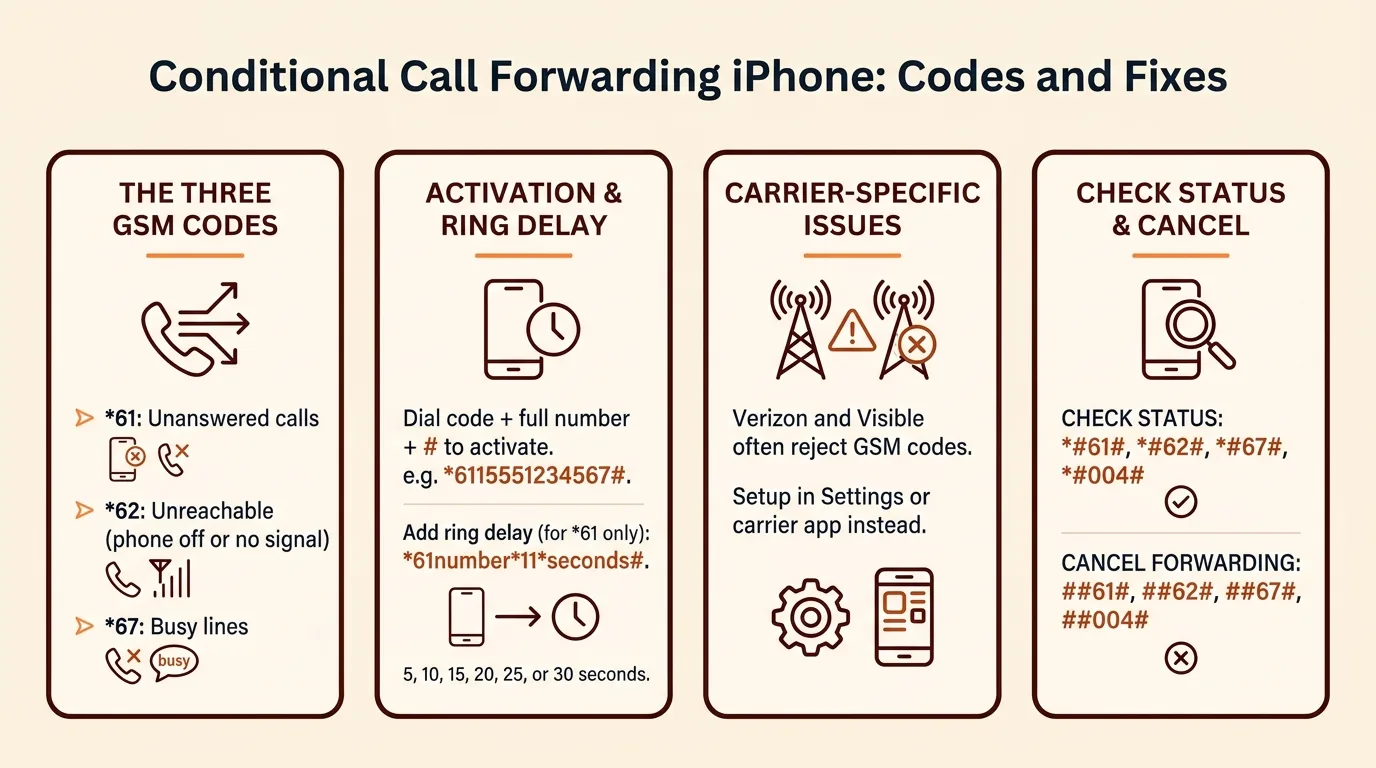
How do you set up conditional call forwarding using carrier codes like *61, *62, and *67?
Open the Phone app, type the code exactly as a phone number, and hit call. Your carrier confirms with a beep or a text. The pattern is always the same: star code, star, destination number, star, optional setting, hash.
Forward when busy: *67
Dial *67* then the number you want calls to reach, then #, and press call. Example: *67*15551234567#. Any caller who hits your line while you are already on a call gets routed there instead of a busy tone.
Forward when unanswered: *61 (with ring-delay control)
Dial *61* plus the destination number and # to forward calls you do not pick up. To control how long your iPhone rings first, add the delay in seconds: *61*15551234567*11*15# forwards after 15 seconds. The 11 is the fixed voice-call setting; the last number can be 5, 10, 15, 20, 25, or 30 seconds. Fifteen to twenty seconds works well if you sometimes answer from the truck; five seconds sends missed calls out faster so nobody waits. If you would rather missed calls go to a service that answers and books appointments for you, the same code works with that number too — see how an AI phone agent handles it at https://saasyvoice.ai/ai-phone-agent-for-nonprofits-and-campaigns.
Forward when unreachable: *62
Dial *62*15551234567# and press call. This catches calls when your phone is off, out of battery, or has no signal, which is exactly when an emergency call from a customer matters most.
Forward all three at once: 004
Dial *004*15551234567# to switch on busy, unanswered, and unreachable forwarding in one step. Dial ##004# to cancel all three together.
What are the exact conditional call forwarding codes for each major US and UK carrier?
The GSM codes are standard, but activation differs: most US carriers accept *61, *62, and *67 dialed directly, while Verizon and Visible require menu-based setup because they run on CDMA heritage networks. You can confirm the code list on Wikipedia's call forwarding reference.
US carriers: AT&T, T-Mobile, Verizon, Visible, Mint
| Carrier | Busy | No answer | Unreachable | Quirk |
|---|---|---|---|---|
| AT&T | 67 | 61 | 62 | Dial normally, then tap Call |
| T-Mobile | 67 | 61 | 62 | Same as AT&T |
| Mint | 67 | 61 | 62 | Uses T-Mobile's network |
| Verizon | Menu only | Menu only | Menu only | Codes often fail; use Settings or *71/*72 variants |
| Visible | Menu only | Menu only | Menu only | Codes unreliable; activate in the app or Settings |
UK carriers: EE, O2, Vodafone, Three
EE, O2, Vodafone, and Three all accept the standard GSM codes: *67* for busy, *61* for unanswered, *62* for unreachable, followed by the forwarding number and #. O2 sometimes needs you to enable forwarding through My O2 first.
Once forwarding works, point it somewhere useful. A tool like SaaSyVoice's AI phone agent can pick up what your forwarding routes to it and book the job while you're on a ladder.
Why does conditional call forwarding fail or show errors on some carriers like AT&T, Visible, or EE?
Most failures come down to four things: the carrier never provisioned forwarding on your line, your plan blocks the codes, the number format is wrong, or the network never confirms the request in the first place.
Prepaid and MVNO restrictions
Prepaid plans and budget carriers like Visible often block or ignore GSM forwarding codes entirely, because forwarding is handled by their own app or not offered at all. If *61 or *62 returns an error or does nothing, call your carrier and ask whether conditional forwarding is enabled on your account. Some will turn it on manually; some will not.
Wrong number format errors
Codes fail silently when the destination number is formatted oddly. Use the full number with country code, like 6118005551234#, not a local format with dashes or brackets.
Carrier-side provisioning blocks
On AT&T and EE, the feature can exist but sit unprovisioned on your line, especially on eSIM or business accounts. The fix is a support call asking them to enable call forwarding on the network side. Until it is, codes like these only route to voicemail or nowhere, and an answering service such as SaaSyVoice (AI phone agent for consultants) cannot pick up what the network never sends.
Why does Settings show forwarding as active but calls still ring through?
Stale carrier registration after a SIM or iOS update
After an iOS update or SIM swap, the network can keep a saved forwarding record that no longer matches your phone. Settings reads the stale record and shows forwarding on, while the network actually rings your phone. Dial the code again (61, 62, or 67 plus the number) to re-register it, or dial *##002# to wipe everything and start fresh.
Dual-SIM: forwarding set on the wrong line
With two lines, forwarding codes apply only to the line you dial them from. If your business number is the secondary line, codes dialed on your primary line do nothing for it. Switch the default line in Settings, dial the codes on the business line, then test with a call to that number.
Carrier voicemail winning the race before forwarding triggers
If unanswered-call forwarding is set to 30 seconds, your carrier voicemail can pick up first. Re-set *61 with a shorter delay, or point forwarding at a service that books jobs instead, like SaaSyVoice, so the call lands somewhere useful.
How do you check, change, or cancel conditional forwarding on iPhone?
Dial the check codes to see what is active: *#61# for unanswered, *#62# for unreachable, *#67# for busy, and *#004# for all three at once. Each sends a status message back to your screen within seconds. UK carriers document the same codes in their support pages, for example EE's call forwarding help.
Reading the status response
The response shows whether forwarding is enabled, the condition it covers, and the destination number, often written as a voice line plus the number. If it says "Disabled" or shows no number, that condition is not forwarding anywhere.
Cancel codes vs the Settings toggle
To change a destination, dial the setup code again with the new number, like 611XXXXXXXXXX*. To cancel, dial ##61#, ##62#, ##67#, or ##004# to wipe all three. The Settings toggle only controls unconditional forwarding, so it will not clear these.

Can you forward missed calls to voicemail, Google Voice, or an AI receptionist?
Forwarding to carrier voicemail vs a live answer
Carrier voicemail is free and already set up, but an after-hours emergency caller hears a beep, not a booking. They hang up and dial the next plumber. Google Voice answers with a menu and takes a message, which is better than nothing but still leaves the job unbooked until you check your phone the next morning.
A live answer, human or AI, keeps the caller on the line, qualifies the job, and books the appointment while you sleep. The tradeoff is cost: voicemail is free, and a service bills monthly.
Pointing *61/*62 at an AI receptionist
The codes don't care what's on the other end. Set 61 or 62 to forward to your AI receptionist's number instead of voicemail, and missed or unreachable calls get answered 24/7, in the caller's language, with appointments booked. SaaSyVoice builds yours from your website in about a minute, offers a free trial with no credit card, and keeps your existing number. If you'd rather answer emergencies yourself, forward only after-hours calls and handle the rest live.
Does conditional call forwarding work on eSIM and dual-SIM iPhones?
Yes, but each line runs its own forwarding rules. Dial *61, *62, or *67 while your business line is selected as the active line for calls; the codes apply only to that line, so repeat them after switching to your personal line if you want coverage there too.
The common failure: the owner's business and personal numbers share one iPhone, a call comes in on the personal line while forwarding is only set on the business line, and it rings through unanswered. Set both.
If you forward to a Google Voice number instead, note that Google Voice only accepts forwarded calls to numbers verified on your account, per Google's Voice help documentation.
How do you turn off the 'Call Forwarding Active' notification after setting it up?
That banner is your carrier confirming each forwarded call, and some US carriers send it every single time. You cannot switch it off in iPhone Settings, so work around it: dial *#61# to check your setup, then disable and re-enable forwarding with the codes from earlier sections, which often resets the behavior. Install any carrier settings update your iPhone prompts (Settings > General > About). If the banner still fires on every call, call your carrier and ask them to disable the forwarding notification on your line.
FAQ
How many seconds can I set before an unanswered call forwards?
You can set 5, 10, 15, 20, 25, or 30 seconds using the delay parameter in the 61 code, for example 611555123456711*15# for 15 seconds. Fifteen to twenty seconds suits owners who sometimes answer from the truck, while five seconds sends missed calls out faster so callers never wait long.
Why did my forwarding codes stop working after I switched carriers?
Codes are tied to the network, not your phone, so a switch can leave forwarding unprovisioned on the new line. Verizon and Visible often reject GSM codes entirely and require menu-based setup instead. Prepaid and budget plans may block forwarding outright. Call the new carrier, ask them to enable conditional forwarding, then re-dial *61, *62, and *67.
Why does Settings show forwarding as active but calls still ring through?
After an iOS update or SIM swap, the network can hold a stale forwarding record that no longer matches your phone, so Settings shows forwarding on while calls still ring. Re-dial the code, such as *61 plus the destination number, to re-register it, or dial *##002# to wipe all forwarding and start fresh.
Does conditional call forwarding work on eSIM and dual-SIM iPhones?
Yes, but each line runs its own forwarding rules. Dial *61, *62, or *67 while your business line is selected as the active line for calls; the codes apply only to that line. Repeat them on your personal line if you want coverage there too, otherwise calls to the unforwarded line ring through unanswered.
How do you turn off the 'Call Forwarding Active' notification?
The banner is your carrier confirming each forwarded call, and some US carriers send it every time. You cannot switch it off in iPhone Settings. Dial *#61# to check your setup, disable and re-enable forwarding with the codes, install any carrier settings update under Settings > General > About, or ask your carrier to disable the notification.