
Call Routing for Small Business: Which Type You Need
Key takeaways
- Solo owners on jobs need time-based routing with after-hours and overflow answering, not round-robin or skills-based rules.
- Teams of 2-10 should use round-robin or simultaneous ringing with a fallback that captures the lead if nobody answers.
- Call forwarding keeps your existing number; routing adds rules like time of day, overflow, and load spreading.
- Flat monthly pricing avoids the per-minute billing surprises that break budgets during busy months.
- Pairing routing with an AI answering service turns missed calls into booked appointments instead of lost jobs.
The right call routing for small business depends on your team size and when calls come in: solo owners on jobs need after-hours and overflow answering, a 2-10 person team needs round-robin or skills-based routing, and emergency-driven trades need time-based rules that never send a customer to voicemail. This guide maps your situation to the routing type that fits, then gives you a vendor-neutral checklist to test any system against before you pay.
What is call routing for small business and why does it matter when you're on a job?
Call routing is the set of rules that decides where an incoming call goes: to your cell, to a teammate, to an after-hours message, or to a service that answers and takes a message. You set it once, and the phone system follows it every time a customer dials.
For a plumber or HVAC tech with no front-desk staff, this matters because you can't answer while under a sink. Every call that hits a busy tone or voicemail is a job your competitor gets. Buyer guides for small business phone systems put typical tool pricing in the $25-$200/month range, with call routing and after-hours handling among the core feature categories (TechnologyAdvice).
Routing alone moves calls; it can't answer them. Pair it with a 24/7 answering service like SaaSyVoice and missed calls become booked appointments instead of lost revenue.
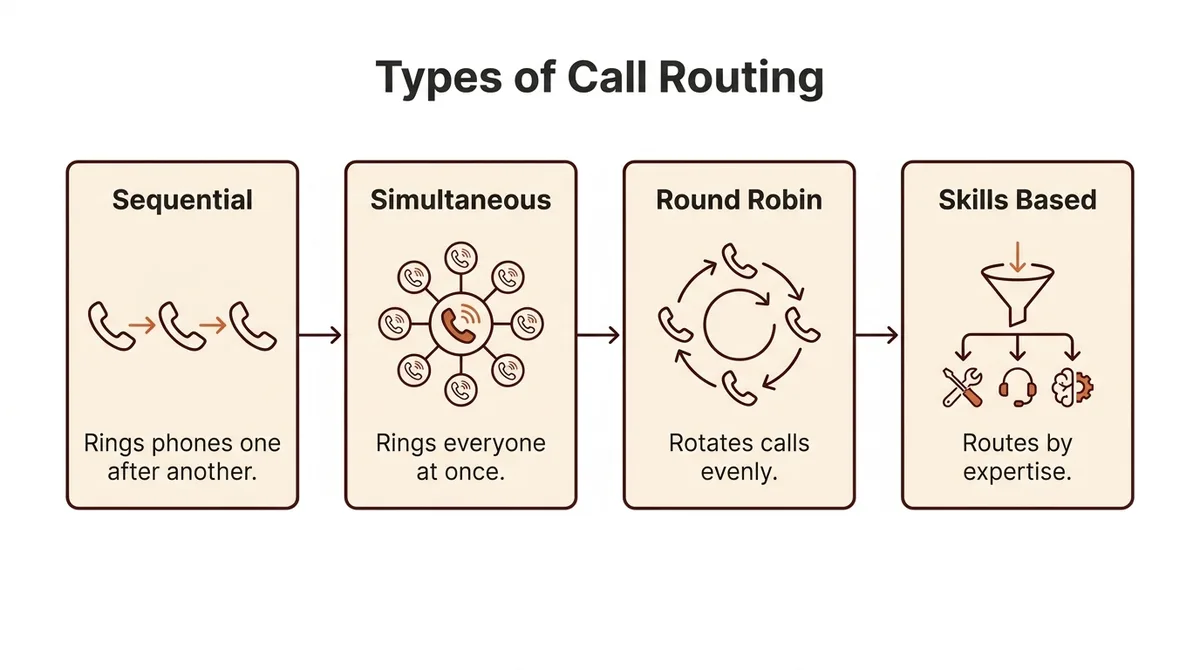
What types of call routing exist and which fits a small business?
Time-based routing
Time-based routing sends calls to different places depending on the hour. During work hours, calls ring your cell; after hours, they go to an answering service that books appointments while you're off the clock. If you've ever lost a $900 water-heater job to a busy tone at 7pm, this is the fix.
Skills-based routing
Skills-based routing sends each caller to whoever can actually handle their request. A two-person HVAC shop might route emergency no-heat calls to the senior tech and routine maintenance bookings to the apprentice. It needs a team with distinct skills, so solo owners rarely use it.
IVR menus
An IVR menu is the "press 1 for quotes, press 2 for emergencies" recording. Done simply, it filters junk calls and gets urgent ones straight to your phone. Done badly, it buries callers in five menu layers, and they hang up and call your competitor.
Round-robin routing
Round-robin distributes calls evenly across your team in order. A three-truck plumbing crew uses it so no single tech drowns in calls while another sits idle. It only works if anyone on the list can take the job.
Quick comparison
| Type | Best for | Watch out for |
|---|---|---|
| Time-based | After-hours coverage | Needs clear schedule rules |
| Skills-based | Teams with different roles | Overkill for solo owners |
| IVR menus | Filtering call types | Too many menu layers |
| Round-robin | Even load across a crew | Everyone must be qualified |
If you miss calls while on jobs, pairing time-based routing with an AI answering service covers your biggest gap first. SaaSy Voice's whitepaper (https://saasyvoice.ai/whitepaper) walks through how that setup handles after-hours and overflow calls in detail.
How should a 2-10 person team route calls differently from a solo owner?
Solo owner on jobs all day
You cannot answer while under a sink, so the right setup is simple: forward your number to an answering service or AI receptionist that picks up every call, takes a message, and books appointments. Keep your number; call forwarding is a settings change, and our call forwarding setup guide walks through it. Skip round-robin and skill-based rules entirely; with one phone, they add cost and nothing else.
Teams of 2-10
With a crew, you want calls to reach whoever can actually take the job. Round-robin routing spreads calls across the team so no one gets buried, while simultaneous ringing lets the fastest picker-upper grab it. The Quo buyer guide on small business call routing covers these routing types and the pricing benchmarks you'll compare against. For a 2-10 person team, the honest tradeoff: round-robin prevents pile-ups but can send a plumbing call to the apprentice least able to quote it, so pair routing rules with a fallback that captures the lead if nobody answers.
Bilingual or multilingual callers
If your area serves Spanish-speaking customers, routing alone won't help; the call needs to be answered in that language. An AI answering service handles this without hiring a bilingual receptionist, and SaaSyVoice answers in any language for under $1/day.
How do time-based and after-hours routing rules work in practice?
Here's a setup that works for a solo plumber. During business hours, calls ring your cell first. If you're on a job and don't answer within three rings, the call overflows to an answering service instead of hitting voicemail. After hours, everything routes straight to the service, which books appointments for the next morning.
Emergency lines work differently. Publish a second number for burst pipes and no-heat calls, and route it to the answering service around the clock with instructions to warm transfer true emergencies to your cell. Routine calls get taken as messages.
The trap is the per-minute surprise: some services bill by the minute, so a chatty after-hours caller costs more than a quick message-taker. Flat monthly tiers, like SaaSyVoice's $29-$199 range, avoid that. Before you commit, run your Google Business Profile through https://saasyvoice.ai/gbp-checkup to confirm your after-hours number is actually what customers see.
Which call routing features matter most for small business vs. enterprise?
Four features carry the weight for a trades owner: keep your existing number so you don't reprint magnets and lose Google reviews tied to it, warm transfer so a caller reaching your cell hears "connecting you now" instead of a dead line, missed-call text back so a job you couldn't answer gets a message and a chance to reply, and pricing you can predict. Per-minute billing is where budgets break, so ask what a busy month actually costs before signing up. Goodcall's product page lists routing, call handling, and message-taking as its core features, which matches what most small-business buyers need (Goodcall features).
What you shouldn't pay for: skills-based routing across departments, supervisor dashboards, and queue analytics built for teams with a front desk. You have one crew and one phone line. If an AI answering service handles overflow, confirm it can take a message, book appointments, and escalate a true emergency, and that missed calls trigger a text back automatically. SaaSyVoice includes missed-call text back on every plan, though it won't do warm transfers to a landline-based shop phone, so check that gap against your setup.

Can call routing work alongside an AI answering service?
Yes, and the setup is simpler than most owners expect. You keep your existing number and add a forwarding rule: during business hours, calls ring your cell or your crew; after hours, or when nobody picks up, the call routes to an AI receptionist that answers, captures the caller's name, number, and job details, and can book appointments or take a message. Treat the AI as the overflow leg of your routing rules, not a replacement for you. A burst pipe at 9pm gets answered instead of hitting voicemail, and you get the lead details by text before you're back in signal. Where it falls short: an AI receptionist can't quote complex jobs or reassure a nervous customer the way you can, so route your best repeat clients straight to your cell if that matters to you. SaaSyVoice handles the missed-call leg for under $1/day, with a free trial and no credit card, and you keep your number.
How much does call routing for small business cost?
Most tools in your range fall into three buckets. Basic call routing alone (forwarding, time rules, voicemail) runs $25-$50/mo. Add an AI answering service that picks up, takes a message, and books appointments, and you're typically at $50-$150/mo. Human receptionist services cost more: Smith.ai starts around $190/mo for 50 calls on its receptionist pricing page, which is why most solo trades skip that tier.
Watch how minutes are billed. Per-minute plans look cheap until a customer rambles or the line stays open during a warm transfer. Flat monthly rates are easier to budget when you're on a roof and can't monitor a meter.
Where surprise fees hide: setup charges, extra numbers, per-appointment fees, and overage minutes billed at a higher rate. Ask for the total at 300 calls/mo, not the teaser rate at 50. SaaSyVoice publishes flat tiers from $29-$199/mo with no per-minute metering, and its own shortcoming is the same one to check anywhere: the cheapest tier caps minutes, so a busy month means upgrading or throttling.
What should you check before committing to a call routing system?
The checklist
- Does it keep your existing number?
- Can you set after-hours rules without calling support?
- What happens on the tenth simultaneous call — busy tone or queue?
- Is pricing flat, or are there per-minute surprises?
- Can it book appointments or only take a message?
- Does it capture the caller's name, number, and job details?
- Can it warm transfer to your cell when you're free?
- Is there a free trial with no credit card?
- Can you listen to recordings of how it handled real calls?
- Can you cancel monthly, or are you locked into a contract?
SaaSyVoice against the same checklist
SaaSyVoice keeps your number, answers 24/7, books appointments, and sends you the caller's details by text, with flat tiers from $29/month and a free trial with no credit card. Warm transfer is on the roadmap, not fully shipped, and recording review is currently limited to transcripts. If your routing needs are mostly "route to my crew by job type," a dial-plan tool may fit better. If your problem is missed calls while you're under a sink, this covers it.
FAQ
Do I need a new phone number to set up call routing?
No. Call forwarding is a settings change on your existing number, so you keep the digits tied to your magnets, Google reviews, and repeat customers. You can add a second number for emergencies if you want one, but the main line stays yours. Any vendor that forces a new number is a red flag for a trades business.
What's the difference between call forwarding and call routing?
Forwarding sends every call to one destination, like your cell. Routing applies rules first: time of day, who answered last, whether the line is busy, and where the call overflows when nobody picks up. A solo owner can often live with forwarding plus an answering service, while a 2-10 person team needs round-robin or simultaneous ringing to spread calls across the crew.
Can an AI answering service handle emergency calls for a plumber or HVAC company?
Yes, if you set it up deliberately. Publish a separate emergency number routed to the service around the clock, with instructions to warm transfer true emergencies like burst pipes to your cell while taking routine calls as messages. The AI answers instantly at 9pm, captures the caller's name, number, and job details, and texts you the lead before you're back in signal.
Is there a free trial with no credit card for call routing tools?
Some offer one, but you have to check. SaaSyVoice runs a free trial with no credit card required, with flat tiers starting at $29/month and no per-minute metering. When evaluating any tool, treat a card-free trial as a checklist item alongside keeping your number, self-serve after-hours rules, and monthly cancellation without a contract lock-in.