
Call Forwarding Code: Every US Carrier Code Compared
Key takeaways
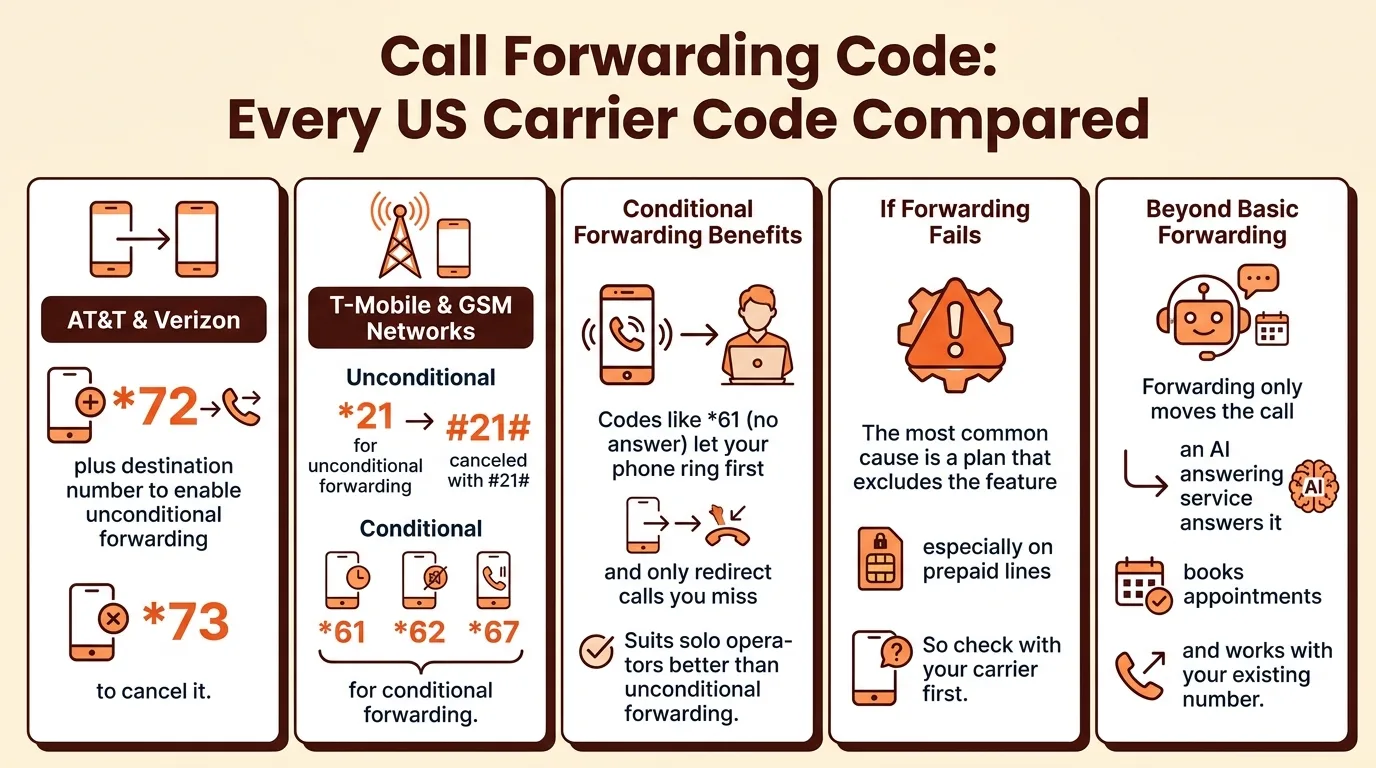
- AT&T and Verizon use *72 plus the destination number to enable unconditional forwarding and *73 to cancel it.
- T-Mobile and most GSM networks use *21 for unconditional forwarding, canceled with #21#, and *61, *62, and *67 for conditional forwarding.
- Conditional forwarding codes like *61 (no answer) let your phone ring first and only redirect calls you miss, which suits solo operators better than unconditional forwarding.
- If a forwarding code fails, the most common cause is a plan that excludes the feature, especially on prepaid lines, so check with your carrier first.
- Forwarding only moves the call; an AI answering service answers it, books appointments, and works with your existing number.
Dial *72 plus the number you want, and your phone rings there until you dial *73 to turn it off. That is the basic call forwarding code, but AT&T, Verizon, and T-Mobile use different codes for forwarding only when you miss a call or are already on a line. Below are all of them in one table, plus what to do when the code does not work on your plan.
What is a call forwarding code and how do you use one?
A call forwarding code is a short sequence you dial from your phone, starting with * or ** and ending with the 10-digit number you want calls sent to, followed by the call button. The universal GSM codes follow a pattern: *72 (or *21* on GSM networks) turns on unconditional forwarding, and dialing *73 turns it off. Your carrier's support page lists the exact codes, like AT&T's call forwarding instructions.
Unconditional vs conditional forwarding
Unconditional forwarding sends every call straight to another number before your phone rings. Conditional forwarding only kicks in when you miss a call, are busy on another line, or your phone is off, using codes like *61*, *62*, and *67* depending on the situation. For a solo operator, conditional forwarding to a backup number or answering service means you keep taking calls on the job and only overflow gets redirected.
How to dial a code step by step
- Dial the code, then the destination number, then press call.
- Wait for a confirmation tone or message.
- Dial the matching "off" code to stop forwarding.
For a full walkthrough with setup screenshots, see our call forwarding setup guide.
What is the AT&T call forwarding code for enabling and disabling forwarding?
AT&T uses *72 to turn on unconditional forwarding (every call goes to your other number) and *73 to turn it off. Dial the code, then the 10-digit number you want calls sent to, and wait for the confirmation tone. To stop forwarding, dial *73 by itself and wait for the tone. Check with AT&T first, because some prepaid and business plans handle these codes differently.
AT&T conditional forwarding codes (busy, no answer, unreachable)
Conditional forwarding only sends calls along when you can't pick up, so you keep first crack at every job call. Dial the code, then the destination number, and hang up after the confirmation tone. Cancel any of them by dialing the code alone.
| Situation | Activate | Cancel |
|---|---|---|
| Every call | *72 + number | *73 |
| Busy | *67 + number | *67 |
| No answer | *61 + number | *61 |
| Phone off or out of range | *62 + number | *62 |
Forwarding your line to an AI receptionist like SaaSyVoice uses the same codes, so you can keep your number and still have after-hours calls answered and booked.
What is the call forwarding code for Verizon?
Verizon Wireless uses *72 to switch on unconditional forwarding and *73 to turn it off, so every call rings the number you forwarded to. Dial *72 plus the 10-digit number, wait for the confirmation tone, and the phone confirms it worked. To cancel, dial *73.
Verizon conditional forwarding codes
Conditional forwarding sends calls to another number only when you want it to: *71 forwards unanswered calls, *80 forwards calls when your line is busy, and *85 forwards calls you don't pick up. That last one matters most for a solo operator: if you're under a sink and can't grab the phone, *85 sends the caller somewhere that can answer, like an after-hours service or an AI answering service for HVAC that books the job.
Why Verizon codes differ from GSM codes
Verizon runs its own network, so it uses star codes that differ from the standard GSM codes other carriers follow. Verizon confirms its forwarding codes for both prepaid and postpaid lines on its call forwarding support page.
What are the T-Mobile and generic GSM call forwarding codes?
T-Mobile runs on the same GSM codes as most carriers worldwide, so one set of dial patterns covers both. Dial the code, then the number, then press call. To cancel, dial the code followed by #.
T-Mobile conditional codes
- *61 forwards calls you don't answer. Example:
*61+15551234567 - *62 forwards calls when your phone is off or out of range. Example:
*62+15551234567 - *67 forwards calls when your line is busy. Example:
*67+15551234567 - *004 enables all conditional forwarding at once. Example:
*004+15551234567
To cancel any of these, dial the code by itself, then #. For example, #61# stops no-answer forwarding.
Generic GSM codes that work on most carriers
*21 is the universal unconditional code: it sends every call straight to the forwarding number before your phone rings. Example: *21+15551234567. Cancel with #21#. Pair unconditional forwarding with an AI receptionist that books jobs while you're on a ladder, like SaaSyVoice does for service businesses.
Which call forwarding code should a one-person business use?
Use conditional forwarding, not unconditional, for both jobs a solo operator needs. Conditional codes (*61, *62, *63 on most carriers) only pass calls along when you miss them, don't answer, or your phone is off, so your cell still rings first. Unconditional (*72 on many carriers) sends everything away immediately, which is wrong unless you want a second line to take over completely.
After-hours emergency calls
At night you want every call answered, so unconditional forwarding makes sense: dial *72 plus your forwarding number at quitting time and *73 to switch it off in the morning. The catch is that a plain forward sends calls to voicemail or a spouse's phone, not someone who books the job. That is the gap an AI answering service for plumbers fills, and T-Mobile documents conditional options like no-answer forwarding in its call forwarding features guide.
Overflow while on a job
During work hours, conditional forwarding is the better fit. Set no-answer forwarding so a call you can't grab while under a sink still rings through to a backup number after a few rings. You keep your main number, callers reach a human or a receptionist instead of voicemail, and nothing changes when you can pick up yourself.
Why isn't my call forwarding code working?
Check with your carrier first
The most common reason a call forwarding code fails is that your plan doesn't include the feature. Many prepaid plans and some business lines restrict conditional forwarding (the 004 and *61/*62/*67 codes) even when unconditional forwarding (72) works fine. Call your carrier or check your account portal before troubleshooting anything else.
VoLTE can also interfere on older phones: if calls route over LTE instead of the legacy network, some codes silently fail. Toggle VoLTE off, dial the code again, and listen for the confirmation tone rather than assuming it worked.
Common error messages explained
- "Feature not available" or three fast beeps — your plan doesn't support that code. Ask the carrier to enable call forwarding on the line.
- "Call forwarding already active" — a previous forward is still set. Cancel it first (73 on AT&T, 720 on Verizon), then dial the new code.
- Nothing happens at all — you may be dialing from a line that isn't the one you're forwarding. Codes only work from the phone being forwarded, not from a second handset or app.
If forwarding keeps failing, an AI answering service that takes calls on a separate number sidesteps carrier restrictions entirely.
Call forwarding vs an AI answering service: which handles missed calls better?
What forwarding can't do
A forwarding code moves the call; it doesn't answer it. Forward to voicemail and the caller hears a beep. Forward to a second phone and someone still has to pick up, which is exactly what you can't do on a roof or under a sink. Forwarding also can't screen spam, quote a price range, or book the job while you're mid-repair. The universal GSM codes themselves, like 004 for conditional forwarding, only control where calls ring, as documented in the GSMA core specifications.
That gap is where an answering service earns its keep. Whether it's a human outfit like Ruby Receptionists or Smith.ai, or an AI receptionist like SaaSyVoice or Goodcall, the point is the same: a caller with a burst pipe at 9pm gets a real conversation, gets qualified, and gets an appointment on your calendar instead of a voicemail they may never leave. SaaSyVoice builds yours from your website in about a minute, answers around the clock, books appointments, and keeps your existing number. Where it falls short: a human service like Ruby handles unusual or emotional calls with more judgment, and SaaSyVoice can't take payment over the phone for you.
How the options compare
Honest criteria: does a caller reach a voice, can it book, what does it cost at 2am, and can you turn it off? Voicemail fails the first test outright. Forwarding to a partner or spouse works only when they're free. AI services like SaaSyVoice, Dialbox, and Phone Stack answer every time and start cheap; human services answer with more judgment but cost more per month. If most of your missed calls are emergencies or bookings, an AI receptionist wins on coverage. If most are nuanced, pay for people.
How do you forward calls to an AI receptionist?
First, keep your number. Any AI receptionist, including SaaSyVoice, works with the number you already advertise, so nothing changes for customers who call you.
Second, forward your number to the AI receptionist number you're given when you sign up. Use the codes from earlier in this article: *72 plus the number for unconditional forwarding on most carriers, or *71 for conditional forwarding so it only picks up when you miss a call or are busy. To stop forwarding, dial *73.
Third, test it. Call your own line from a second phone, let it ring out, and confirm the receptionist answers, books the appointment, and texts you the details. Check it after hours too.
FAQ
Does call forwarding cost extra on AT&T or Verizon?
Forwarding is usually included at no extra charge on postpaid plans, but forwarded calls can bill as outgoing minutes on some plans, especially older or prepaid ones. Prepaid lines sometimes restrict conditional forwarding entirely. Check your plan details with AT&T or Verizon before relying on the codes, since treatment varies by plan type.
Can I forward calls only when I don't answer?
Yes. That is conditional forwarding, and every major carrier supports it. On AT&T dial *61 plus the number for no-answer forwarding; on Verizon dial *71; on T-Mobile and other GSM networks dial *61 plus the number. Your phone rings first, and the call only moves if you miss it. Cancel by dialing the code alone.
How do I turn off call forwarding and go back to normal?
Dial the cancel code for the forwarding type you set. On AT&T and Verizon, *73 stops unconditional forwarding. On GSM networks like T-Mobile, dial the activation code followed by #, for example #21# or #61#. Wait for the confirmation tone, then test by calling your line from another phone to confirm it rings normally.
Does *72 work on Verizon prepaid?
Verizon documents *72 and *73 for both prepaid and postpaid lines on its support pages, so the code should work. That said, prepaid plans sometimes restrict conditional forwarding codes even when unconditional forwarding works, and features can change. If *72 fails on a prepaid line, contact Verizon to confirm call forwarding is enabled on your account.
Will forwarded calls still show my business number?
Yes, in most cases. The forwarding code moves the call, but the caller's original number usually travels with it, so you and your answering service see who called. Some carriers or devices may display the forwarding number instead, depending on how the network handles the handoff. Test with a call from a second phone to confirm what appears.