
AI Receptionist Real Estate Property Routing Guide
Key takeaways
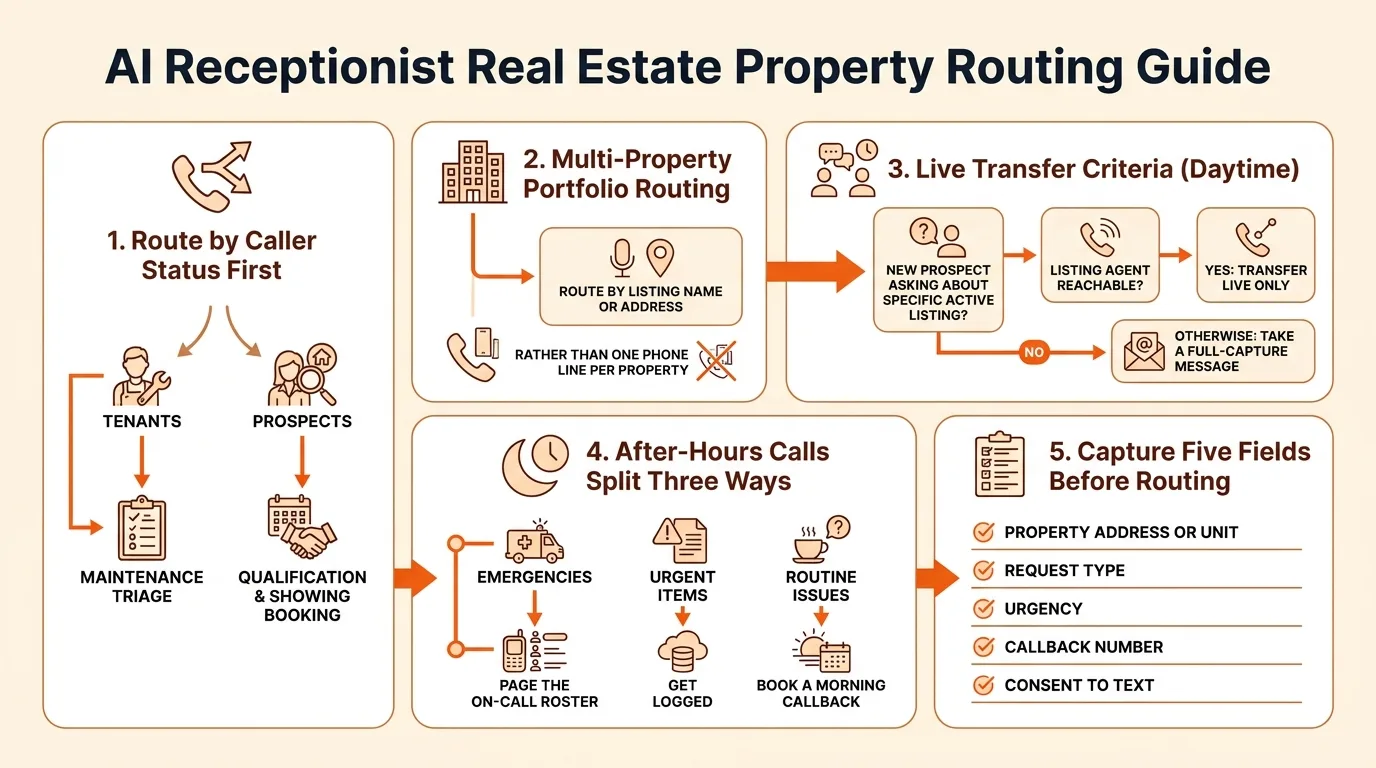
- Route by caller status first: tenants go to maintenance triage, prospects go to qualification and showing booking.
- For multi-property portfolios, route by listing name or address rather than maintaining one phone line per property.
- Transfer live only when the caller is a new prospect asking about a specific active listing and the listing agent is reachable; otherwise take a full-capture message.
- After-hours calls split three ways: emergencies page the on-call roster, urgent items get logged, and routine issues book a morning callback.
- Capture five fields before routing: property address or unit, request type, urgency, callback number, and consent to text.
Route tenant calls by urgency first: a maintenance emergency goes to your on-call line or after-hours booking flow immediately, while a leasing inquiry from a prospect gets qualified and booked with whoever handles showings. Everything else, like agent transfers or messages, follows simple rules based on listing and portfolio size. This article gives you that tiered routing framework, broken out for solo agents, brokerages, and property managers.
What is ai receptionist real estate property routing?
Property routing is what an AI receptionist does the moment a call comes in: it figures out which property or listing the caller is asking about, whether the caller is a current tenant, a prospective buyer or renter, or another agent, then routes the call or books the appointment based on that answer. A tenant with a burst pipe goes down a different path than a renter asking about a 2BR listing or an agent scheduling a showing.
The stakes are high because inbound calls are your best leads. The National Association of REALTORS maintains research and statistics showing how much real estate business runs on phone contact and referrals (NAR research and statistics), and every missed call while you're on a job or asleep is a prospect who usually calls the next agent on the list instead. An AI receptionist like SaaSyVoice's AI receptionist for real estate answers those calls, captures the property and caller details, and either books, transfers, or takes a message so no lead dies in voicemail.
How should an AI receptionist route calls differently for tenants vs. prospective buyers or renters?
The same phone number serves two completely different callers, so the first job of the AI receptionist is figuring out which one is on the line. A tenant calling about a broken water heater needs a different flow than a renter asking if the two-bedroom on Elm Street is still available. Route by caller status first, then handle the actual request.
Tenant calls: maintenance triage first
Tenants get asked what's wrong and how urgent it is. A no-heat situation or active leak gets flagged as an emergency call and escalated immediately, even at 2 a.m. Routine items like a dripping faucet get logged with photos-by-description, unit number, and permission-to-enter, then queued for the next business day. The outcome is a work ticket, not an appointment.
Prospect calls: qualify, then book
Prospects get listing questions answered first: availability, rent, pet policy, move-in date. Then the AI qualifies them on budget and timing and books a showing directly on your calendar. The outcome is a booked tour with a qualified lead attached.
| Tenant | Prospect | |
|---|---|---|
| First question | What's the issue? | Which listing? |
| Capture | Unit, urgency, entry permission | Budget, move-in date, pets |
| Outcome | Work ticket or emergency escalation | Booked showing |
Forward both caller types to the same number and let the receptionist sort them; the call forwarding setup takes minutes and keeps your existing line.
What call routing rules matter most for a multi-property portfolio?
Route by listing, not by phone number
Once you manage more than a handful of doors, one phone line per property stops working. Instead, let the AI receptionist ask callers which property they're calling about, match the answer against your listings by street address or unit number, and route from there. Vendors in this space describe this pattern in their own documentation, including Dialbox's setup guides, which cover routing calls by property rather than by line. The payoff: a caller who says "the duplex on Maple" reaches the right context without you memorizing which number they dialed.
The rule that saves the most time is separating current tenants from prospects. A tenant calling about a leak in unit 3B should go straight to your maintenance flow, with the address and unit captured before anything else. A prospect asking "is the Maple duplex still available?" should hear availability, get qualified on move-in date and budget, and be offered a showing slot. Same property, two completely different paths, and the AI needs only one question, "are you a current tenant or interested in renting?", to pick the right one. SaaSyVoice handles both branches from the same call flow, which you can configure on its features page.
A copyable routing rules table
Set your rules in three columns: caller type, property detail, and destination. Tenant plus maintenance issue goes to the emergency or work-order flow. Prospect plus named listing goes to availability and showing booking. Prospect with no listing in mind gets asked which property first. Anything ambiguous, a caller who won't say which unit, or a vendor calling about a property, takes a message with the property name captured. Copy that table into your call flow before launch and test it against your last month of voicemails.
(Word count check: ~205)
When should an AI receptionist transfer to a specific agent instead of taking a message?
Transfer live when three things line up: the caller is a new prospect (not an existing tenant), they're asking about a specific active listing, and the listing agent is actually reachable. A buyer ready to tour a unit today is a hot lead; a voicemail two hours later often means they called the next agent on the list.
If the agent of record can't pick up, choose a warm transfer to their cell before falling back to a message. A message with full capture is the better call when the caller is an existing tenant with a routine issue, when it's a general question like "what's the deposit," or when you'd be dumping a cold lead on an agent mid-showing.
The trade-off: transfers feel faster but fail silently if nobody answers. A message with name, number, property address, and reason can't be dropped. SaaSyVoice does both, and the $79 tier (pricing) covers the message-plus-notify flow most solo agents actually need.
How do after-hours maintenance emergencies get routed without a human receptionist?
After-hours calls should hit a three-way split: emergency, urgent, or can-wait-tomorrow. The AI asks two classification questions first — is water flowing, power out, heat off, gas smelled, or a door unsecured — and is anyone in the unit safe? A yes pages you immediately with the caller's number, address, and unit. A no gets logged and booked for the morning.
Emergencies escalate to your on-call roster, not to a generic inbox. If you use a rotating on-call list, the receptionist should know who is up tonight and dial them directly, falling back to you if nobody picks up. Non-emergencies get a maintenance ticket and a morning callback slot instead of waking you at 2 a.m.
What gets booked versus paged is your policy, so write it down: burst pipes and no heat in winter page; a dripping faucet books. SaaSyVoice's tiers run $79 to $199 a month, and its Ruby Receptionists alternative page breaks down how that compares with a human night service. See SaaSyVoice's pricing for what each tier includes before you commit.

What information should the AI capture before routing a property inquiry?
Five fields, no more: the property address or unit number, what the caller wants (a showing, a lease question, a maintenance issue), how urgent it is, a callback number, and permission to text.
Address first. It tells the AI which listing or tenant file the call belongs to, which decides everything downstream. For maintenance calls, the issue description and urgency together determine whether it pages your on-call vendor or queues for morning. For prospects, the listing of interest plus urgency (touring this week vs. browsing) tells you whether to warm transfer to the agent or offer the next showing slot.
Always ask consent to text. Prospects expect it, and texting the appointment link cuts no-shows. Skip anything you would not act on.
How does routing differ between a solo agent, a brokerage, and a property manager?
Solo agent
You are the only destination, so routing is simple: qualify the caller, book the appointment, and send you a summary. Forward your cell to the AI when you are with a client; carriers like AT&T let you set up call forwarding from your phone's settings or your online account (AT&T support). A flat-rate AI receptionist fits this profile well.
Small brokerage
Two or three agents means routing by listing and by who is on rotation. The AI should ask which property the caller is asking about, then route to the listing agent or take a message if that agent is busy. Watch the limits here: SaaSyVoice routes by the rules you write, but it has no native sync with your MLS or CRM, so you update listings and on-call assignments yourself.
Property manager
Tenants, owners, and prospects need three different flows, plus the after-hours emergency path covered earlier. This is where SaaSyVoice fits best for small portfolios, and where it falls short on larger ones: no native CRM or property-management software sync means you maintain tenant and unit data manually. Smith.ai and Ruby offer human-backed plans if you need that handled for you.
How do you test and refine your property routing flow after launch?
Call your own line first, before any customer does. Dial in as a tenant with a leaking water heater, then as a prospect asking about a two-bedroom, then as an owner. If the AI can't tell those three apart, fix the prompts before launch day.
Seed test scripts for each caller type you defined earlier, including one spam call and one wrong-number call. Run them weekly for the first month. You'll find misrouted calls within days, not months.
Review transcripts every Friday and look for one pattern: questions the AI answered badly or captured incompletely. Tighten the prompt for that case, then retest the same script. Small prompt edits beat rebuilds.
Expect the routing flow to be wrong in places at launch. The weekly loop of test, review, adjust is what makes it right.
FAQ
Can an AI receptionist tell which property a caller is asking about if I manage dozens of listings?
Yes. The receptionist asks which property the caller means, then matches the answer against your listings by street address or unit number. A caller who says "the duplex on Maple" gets routed with the right listing context, so you never need one phone line per property or a memorized dial-in mapping.
Will callers know they're talking to an AI before being transferred to my agent?
That depends on how you configure the greeting, and disclosure is your call. Most operators have the receptionist introduce itself plainly at the start of the call, which sets expectations before any live transfer to an agent's cell. A warm transfer works better when the caller already knows what picked up the phone.
How much does an AI receptionist cost for a small property management company?
Budget roughly $79 to $199 per month for a tiered AI service like SaaSyVoice, where the entry tier covers message capture and notifications and higher tiers add more routing capability. Compare that against a human-backed night service from providers like Smith.ai or Ruby, which typically costs more because people answer the calls.
Can I keep my existing business number and forward calls to an AI receptionist?
Yes. Forward your existing line to the receptionist and let it sort tenant, prospect, and owner calls from that single number. Carriers like AT&T let you enable forwarding from your phone's settings or online account, and setup takes minutes. Your printed signs, listings, and tenants all keep dialing the number they already know.
What happens if a tenant insists on speaking to a human during an emergency call?
The emergency path already pages a human: the receptionist dials whoever is on the on-call roster with the caller's number, address, and unit, falling back to you if nobody answers. If the tenant refuses to keep talking to the AI, the escalation should still fire, since the classification questions and page happen before the conversation ends.