
AI Missed Call Text Back: Setup Blueprint for Home Services
Key takeaways
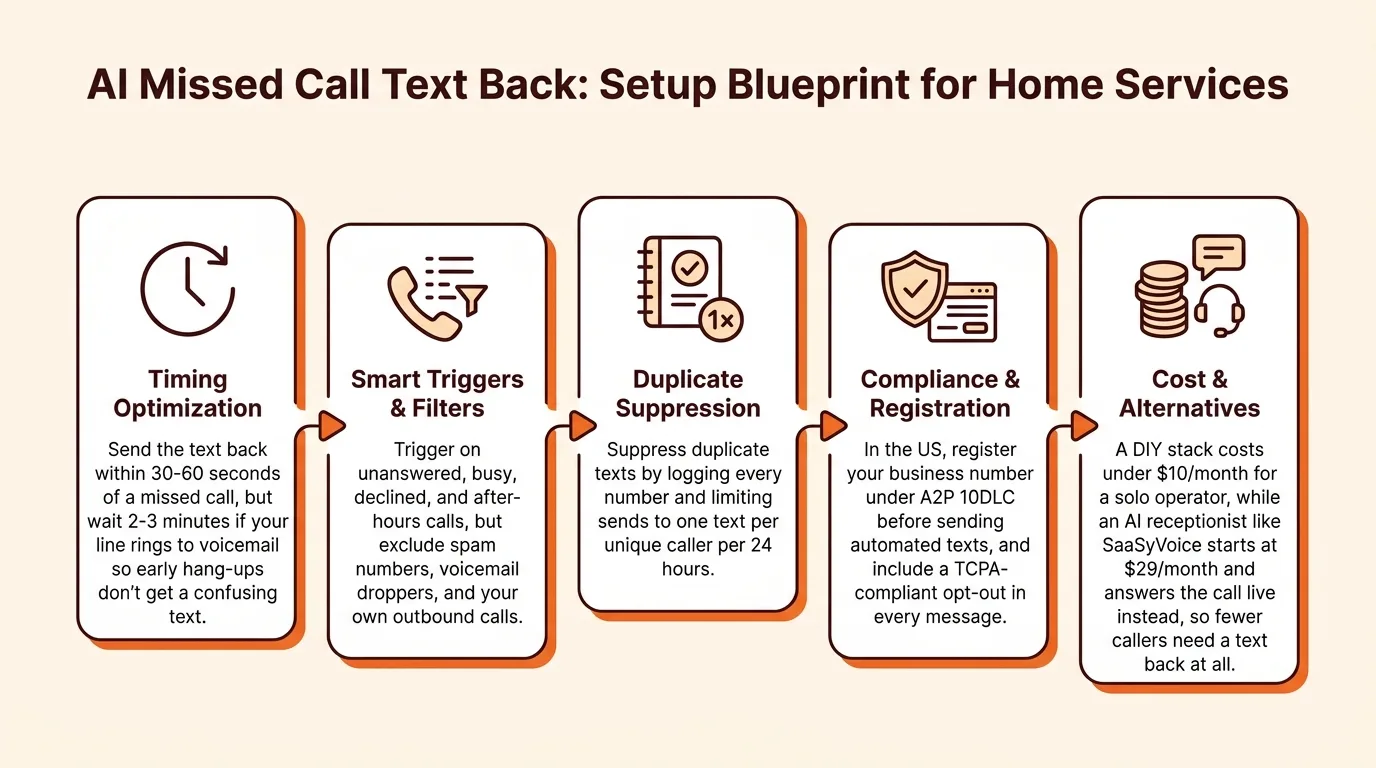
- Send the text back within 30-60 seconds of a missed call, but wait 2-3 minutes if your line rings to voicemail so early hang-ups don't get a confusing text.
- Trigger on unanswered, busy, declined, and after-hours calls, but exclude spam numbers, voicemail droppers, and your own outbound calls.
- Suppress duplicate texts by logging every number and limiting sends to one text per unique caller per 24 hours.
- In the US, register your business number under A2P 10DLC before sending automated texts, and include a TCPA-compliant opt-out in every message.
- A DIY stack costs under $10/month for a solo operator, while an AI receptionist like SaaSyVoice starts at $29/month and answers the call live instead, so fewer callers need a text back at all.
An AI missed call text back automatically texts any caller you couldn't answer, usually within 30 seconds, so the job gets booked instead of lost to the next plumber on Google. This blueprint gives you the exact trigger conditions, timing windows, follow-up logic, and failure cases to build the workflow yourself or buy one with a checklist instead of a sales pitch.
What is an AI missed call text back and how does it work?
An AI missed call text back is an automated workflow that sends a text message to anyone whose call your business number missed. The caller hung up (or never got answered), your system detects the missed call, and within seconds a text goes out from that same number: "Sorry we missed you, this is Mike's Plumbing. What's going on?" The conversation then continues by text, or hands off to an AI receptionist that can answer questions and book the job on the spot.
The four stages: trigger, message, reply handling, booking
Trigger. The system watches your business line and fires when a call rings past your answer window, hits voicemail, or arrives after hours. Good triggers exclude spam and repeat callers so you don't text the same person twice.
Message. An automated text goes out from your business number. In the US, texting customers from a regular 10-digit number requires registering through carriers under A2P 10DLC rules, per Twilio's A2P 10DLC guide, so budget for that step if you build it yourself.
Reply handling. When the customer texts back, either a template flow or an AI receptionist reads the message and responds. An AI receptionist like SaaSyVoice takes a different route: it answers the call live, so "how much for a water heater swap?" gets answered on the phone instead of in a text thread.
Booking. The conversation ends with a confirmed appointment on your calendar, or a warm handoff if the job needs a human.
When should a missed call trigger a text back (and when should it not)?
A text back should fire when a call goes unanswered after a set number of rings, when your line is busy because you're already on a call, when after-hours forwarding kicks in, or when you decline a call while working on another job. Each of these means a real person tried to reach you and got nothing.
Rings, busy, and after-hours triggers
| Trigger | When it fires | Typical setting |
|---|---|---|
| Unanswered | No pickup after X rings | 3-4 rings (~15-20 seconds) |
| Busy | You're on another call | Immediately |
| Declined | You reject while on a job | Immediately |
| After-hours | Call arrives outside business hours | Per your schedule |
Set the ring threshold high enough that you can grab the call if you're free, but low enough the caller isn't waiting. If you forward your line to an AI receptionist, the trigger logic lives in your call forwarding rules — see our call forwarding setup guide.
Exclusions: spam, voicemail drops, and your own outbound calls
Not every missed call deserves a text. Three exclusions matter most:
- Spam and robocalls. Texting a robocaller gets you nothing and can invite more spam. Filter known spam numbers before the trigger fires.
- Voicemail drops. If the caller left a voicemail, a text back saying "sorry we missed you" looks robotic and can double-contact them. Either suppress the text when a voicemail exists, or make the text reference it.
- Your own outbound calls. If you call a supplier and they miss it, your system may log it as an inbound miss and text them by accident. Exclude outbound numbers from triggering.
Get these exclusions right or the workflow texts the wrong people.
How fast should the text back arrive, and what should it say?
Timing rules and why 30 seconds matters
A Harvard Business Review lead-response study found that firms that tried to reach a lead within an hour were nearly 7x likelier to qualify it than firms that waited even an hour longer (The Short Life of Online Sales Leads). For missed calls, send the text within 30-60 seconds so it lands while the caller is still looking at your number. One exception: if your line rings to voicemail, wait 2-3 minutes before texting. Callers who hang up mid-ring will otherwise get a text for a call they don't think was missed, and it reads as a robot. A short delay also lets you see whether they left a voicemail, so your message can reference it.
Message templates by business type
- Plumber/HVAC: "This is Mike's Plumbing, sorry we missed you. What's going on with the job? If it's an emergency, call back and we'll pick up."
- Restaurant: "Sorry we missed your call! Text us your party size and time, and we'll confirm your table."
- Solo practitioner (salon, tutor, consultant): "Hi, this is Dana. I'm with a client. Reply with a good day and time and I'll book you."
What the first reply should capture
Ask three things: what they need, when they need it, and whether it's urgent. That's enough to triage a job, book an appointment, or flag an after-hours emergency. If you'd rather the call itself be answered and booked while you're on a ladder, an AI receptionist such as Goodcall or our own SaaSyVoice handles it.
How do you stop duplicate texts and other failure cases?
Duplicate suppression windows
Log every number you text and suppress repeats for at least 24 hours, or one business day. Without this, a caller who rings three times in an hour gets three identical texts, which reads as spam. Check the log before sending, not after.
Voicemail-drop and callback false positives
Only trigger on calls your system can confirm were missed. If a caller hangs up after you answer, or leaves a voicemail you will return in ten minutes, a text back looks sloppy. Suppress the text when the call hit voicemail, and re-check the log at send time so a caller who already reached you gets nothing.
US carrier rules: A2P 10DLC registration
US carriers filter automated texts from unregistered numbers, so register your business number through your texting provider's A2P 10DLC process before launch. Unregistered traffic gets blocked silently, and you will never know your texts are not arriving. SaaSyVoice doesn't send automatic text-backs, but when you text a caller back yourself from your SaaSyVoice number, the carrier registration and STOP opt-outs are already handled.
What happens after the caller replies to the text?
Auto-reply keywords vs AI takeover
Start with keywords: "YES" or "quote" confirms interest, "STOP" kills the thread, "URGENT" flags the message. Anything else should hand off to an AI receptionist that asks what the job is, where, and when, then books or summarizes for you. This is the same job a paid service does on the phone; Smith.ai sells per-call plans for it and Ruby Receptionists sells per-minute plans, per Smith.ai's and Ruby's pricing pages.
Emergency triage and escalation rules
Set hard rules: burst pipe, no heat, sparking panel means call your cell immediately and keep ringing until someone answers. Everything else waits. If you don't answer the escalation, the AI should tell the caller you've been alerted and will call back as soon as you can, and keep the thread alive.
Booking directly from the text thread
Let the AI offer two or three real slots from your calendar and confirm by text. SaaSyVoice does the same on the phone: it offers open slots from your Google or Outlook calendar during the call and books the job before the caller hangs up (see how it works for plumbers). Non-urgent replies that arrive during quiet hours wait until morning.
Should you build the workflow yourself or use an AI answering service?
DIY stack: what it takes
DIY means your VoIP provider, a texting tool, and Zapier-style automation stitched together. Setup takes an afternoon or two, and you control every word of the text back. But it only texts after the caller hangs up. It never answers the call, so an after-hours emergency still hits voicemail, and duplicate handling depends on your automation catching the same number twice.
All-in-one tools compared on the same criteria
An all-in-one service answers the call and books the job in one place. Goodcall and Rosie are AI receptionists, Smith.ai pairs human receptionists with an AI option, and Ruby Receptionists and PATLive use live agents; they differ in pricing model (per-minute, per-call, or flat monthly) and in whether a person picks up. On cost, DIY wins monthly. On setup time and booking, the all-in-one wins because one system answers and books, and a caller who gets a live answer doesn't need a text back.
Where SaaSyVoice falls short
SaaSyVoice answers live and books appointments, but it doesn't send automatic text-backs. If a caller hangs up before the AI finishes, it emails you their number, and on paid plans you can text or call them back from your SaaSyVoice number in one tap. If you want an automatic text with trigger rules and wording you control, a DIY stack gives you that; we do not. And if you want a human picking up, look at Smith.ai or Ruby instead.
How much does a missed call text back setup cost?
DIY, you pay for the phone number and each outbound message: Twilio-style numbers run roughly $1–2/month plus fractions of a cent per SMS, so a solo plumber texting back a few dozen missed calls spends under $10/month. Answering services price differently. Smith.ai, PATLive, Ruby Receptionists, Goodcall and Rosie all charge per-minute, per-call, or flat-rate monthly plans, and their published tiers vary widely, so compare against your actual missed-call volume before committing.
SaaSyVoice publishes plans from $29/month (60 minutes, about 20 calls) to $449 (2,000 minutes), with Solo ($79, about 100 calls) and Business ($199, about 250 calls) in between. One recovered after-hours job, a water heater swap or a no-cool call, typically covers the month.
One cost that is not optional: automated texts require caller consent under TCPA rules, so your message must include an opt-out and you must honor it. The FCC's guidance on automated calls and texts spells out the basics: FCC guide to unwanted robocalls and texts.
How do you set up an AI missed call text back in one afternoon?
Setup checklist
- Pick your number path. Forward unanswered calls to a new AI number, or port and connect your existing line so callers never see a second number.
- Set the trigger. Text back on unanswered, busy, and after-hours calls. Skip calls shorter than one ring (usually wrong numbers) and calls you declined manually.
- Set timing. Send within 30-60 seconds. Set quiet hours, say 9pm-7am, so a 2am wrong number does not wake a customer.
- Load templates. One message for after-hours, one for busy, one for while-you're-on-a-ladder. Each names your trade and offers to book.
- Set duplicate suppression. One text per unique caller per 24 hours, no matter how many times they call back.
Test script before you go live
Use a second phone. Call and let it ring out, call twice in ten minutes, and call during quiet hours. Check each text lands once, reads like a human wrote it, and a reply reaches you. Fix those three failures before a real customer finds them.
FAQ
Does missed call text back work if the caller hangs up before voicemail?
Yes. The trigger fires on any unanswered call, whether the caller hangs up mid-ring or waits for voicemail. Timing matters: if your line rings to voicemail, wait 2-3 minutes before texting so callers who hung up early don't get a text for a call they don't consider missed, and so you can check whether they left a voicemail first.
Will the caller get charged or will it look like spam?
Receiving a text costs the caller nothing on standard mobile plans, and a message from your registered business number reads like a normal text from a local shop. It looks like spam when you text the same person repeatedly or message robocallers, which is why duplicate suppression and spam filtering belong in the setup.
Can I use my existing business number for text back?
Yes. You can either forward unanswered calls to a new AI number or connect your existing line directly so callers never see a second number. Forwarding is faster to set up; connecting your line keeps the caller experience identical. Either way, the text back should come from a number the customer recognizes as yours.
What is the difference between missed call text back and a full AI receptionist?
Text back fires only after the caller hangs up; it never answers the phone. A full AI receptionist answers live calls, handles after-hours emergencies, and books jobs during the call itself. Text back is cheaper and simpler, but an emergency caller still hits voicemail. Many services bundle both, with the text back as one feature among several.
Do I need to register my number to send automated texts in the US?
Yes. US carriers require registration under A2P 10DLC rules through your texting provider before they will deliver automated messages from a 10-digit business number. Unregistered traffic gets filtered silently, so your texts may never arrive and you would not know. You also need caller consent and an opt-out under TCPA rules.