
Goodcall Alternative: Best AI Answering Services Compared
Key takeaways
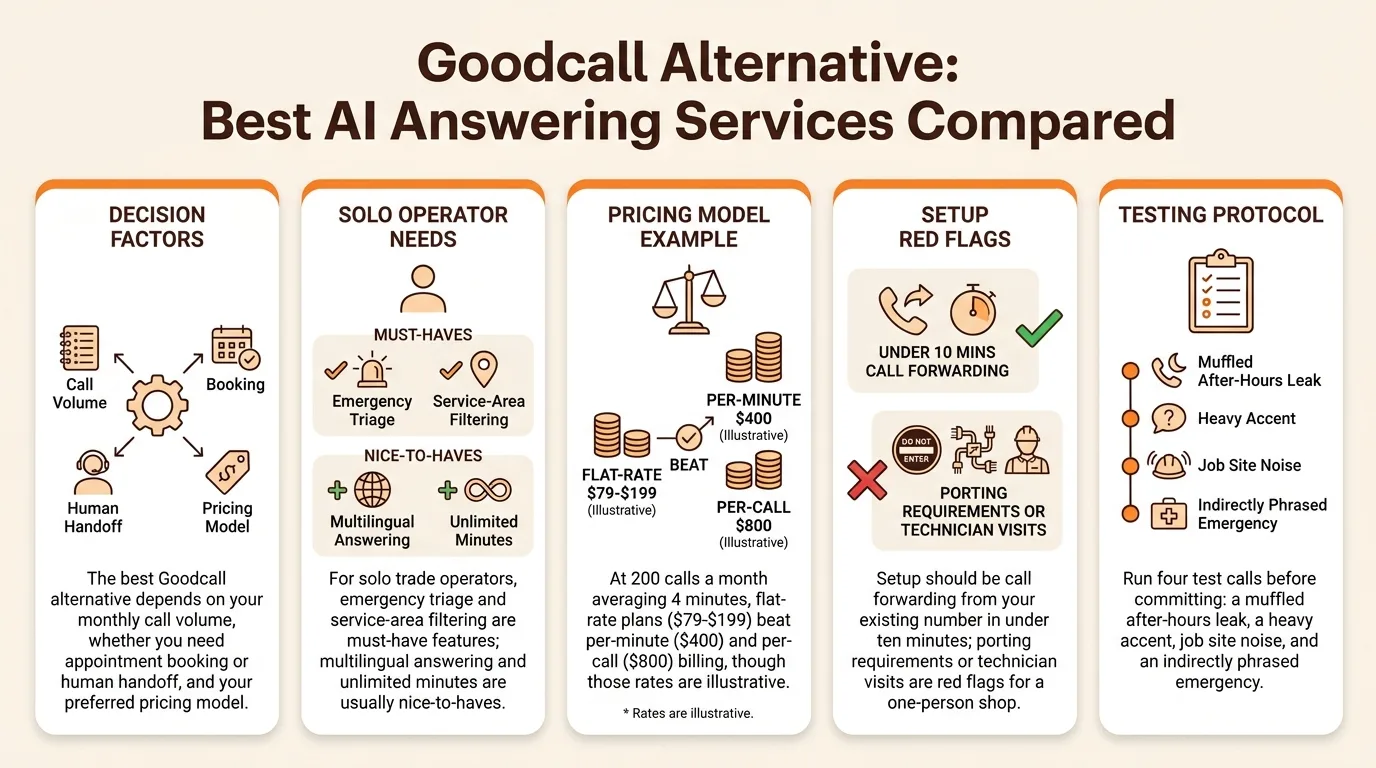
- The best Goodcall alternative depends on your monthly call volume, whether you need appointment booking or human handoff, and your preferred pricing model.
- For solo trade operators, emergency triage and service-area filtering are must-have features; multilingual answering and unlimited minutes are usually nice-to-haves.
- At 200 calls a month averaging 4 minutes, flat-rate plans ($79-$199) beat per-minute ($400) and per-call ($800) billing, though those rates are illustrative.
- Setup should be call forwarding from your existing number in under ten minutes; porting requirements or technician visits are red flags for a one-person shop.
- Run four test calls before committing: a muffled after-hours leak, a heavy accent, job site noise, and an indirectly phrased emergency.
The best Goodcall alternative depends on your monthly call volume, whether you need it to book appointments or hand off calls to a human, and how you want to pay: per-minute, per-call, or flat-rate. This guide gives you a side-by-side pricing and feature matrix plus a fill-in buyer's checklist, so you can match a service like SaaSyVoice, Smith.ai, or Ruby to your actual call load and budget in one sitting.
Why are businesses looking for a Goodcall alternative?
Most owners start shopping after three triggers stack up: the bill grows with call volume, a feature they need is missing, or the service doesn't understand how a trade business actually runs. Pricing is the usual first push. Goodcall's plans are built around monthly subscriptions and usage limits (Goodcall), and per-minute or per-seat billing gets expensive once every missed call, spam call, and after-hours ring routes through the service. Feature gaps come second: no warm transfer to your cell, no appointment booking on your calendar, no per-call option for slow seasons.
Common switching triggers
Volume-based overage bills, flat-rate predictability, unlimited minutes, and trade-specific call handling (quoting a burst pipe, not taking a message) drive most searches for a Goodcall alternative.
When Goodcall is still the right fit
If your call volume stays low, you mainly want messages taken, and you're happy on a monthly plan, switching may cost more than it saves.
What does a missed call actually cost a solo operator?
When you're the tech, the dispatcher, and the front desk, every call you can't pick up is revenue walking to the next plumber on Google. A two-person office can absorb a missed ring; a one-truck operation usually can't.
The HVAC tech on a ladder scenario
You're halfway up a ladder with a compressor in your hands when the phone rings. You can't answer, the caller doesn't leave a message, and they dial the next shop. That one unanswered call can be a multi-thousand-dollar install gone, not a $150 service visit. This is exactly the scenario buyer guides use to illustrate the problem, and it's the norm for solo operators, not the exception. An AI receptionist that picks up every ring means the job gets booked while you keep working.
After-hours and emergency calls
Burst pipes and dead furnaces don't check your business hours. Many of your highest-ticket emergency jobs come in after 5 p.m., when a human answering service like Smith.ai or Ruby charges staffed-shift rates to cover them. An AI receptionist answers at 2 a.m. the same as 2 p.m., qualifies the emergency, and books the appointment before a competitor's voicemail does. Coverage, not politeness, is what saves the call.
What features should you compare across AI answering services?
The 8-point buyer's checklist
Run every provider through the same eight questions: 24/7 coverage, appointment booking on your calendar, emergency triage, service-area filtering, message delivery (text and email), multilingual answering, warm transfer to your cell, and per-call or per-minute pricing that fits your volume. Any service that stumbles on the first four is a poor fit for a trade business.
Must-haves vs nice-to-haves for trades
For a plumber or HVAC solo operator, emergency triage and service-area filtering are must-haves. Triage means the AI asks whether there's water pouring through a ceiling right now, then rings you immediately instead of taking a message. Service-area filtering stops the AI from booking a job two counties away.
Appointment booking and message delivery sit just behind. Multilingual answering is a nice-to-have unless your market demands it; unlimited minutes matter only at high volume.
The stakes are real: a single missed call on a job site can mean a multi-thousand-dollar install walking to the next listing, which is why trade buyer guides keep hammering the same scenario.
We hold SaaSyVoice to the same list. It builds from your website in about a minute, books appointments, and answers after-hours, and live transfer to your cell is included on every plan, so test it on your own line before committing. If you're weighing a human-staffed option, see our Ruby Receptionist alternative breakdown.
How do pricing models differ between Goodcall alternatives?
Per-minute and per-call explained
Per-minute billing charges every second the line is open, so a chatty caller costs more than a quick one. Per-call billing charges each unique caller the same amount regardless of length. Per-minute rewards short calls; per-call rewards long ones. Ask whether spam and robocalls count, because a flood of junk calls can inflate a per-call bill fast.
Flat-rate and unlimited-minutes plans
Flat-rate plans charge one monthly fee and absorb the call volume, which makes budgeting simple. Unlimited-minutes plans work the same way in spirit, but read the terms: some cap concurrent calls or throttle after heavy use. For a plumber whose after-hours emergency calls can run ten minutes, a flat rate removes the fear of an ugly invoice. The trade-off is you may pay for capacity you don't use in a slow month.
Worked example: 200 calls a month
Say you get 200 calls a month averaging 4 minutes, so 800 billed minutes.
| Model | Rate (illustrative) | Monthly cost |
|---|---|---|
| Per-minute | $0.50/min | $400 |
| Per-call | $4/call | $800 |
| Flat-rate / unlimited | $79–$199 | $79–$199 |
Illustrative rates, not quotes. At that call pattern, flat-rate wins; per-minute only wins if your calls are short and rare. SaaSyVoice sits in that flat-rate band: 800 minutes a month is its $199 Business plan, with no per-minute overage billing. And if a caller hangs up before the AI can finish, its missed-call recovery emails you their number so you can call back.
Which providers are the leading Goodcall alternatives?
Comparison matrix
Goodcall, Smith.ai, PATLive, Ruby Receptionists, and Rosie all answer calls around the clock, but they differ on who does the answering and how you pay. Smith.ai and Ruby use human receptionists with AI support, which raises cost but handles nuance. Goodcall, Rosie, and SaaSyVoice are AI-first, which keeps per-call costs low. PATLive uses live agents on monthly minute bundles. None of these pricing details should be trusted from memory; confirm current tiers on each vendor's site before you decide.
Where each option fits best
Pure-AI answering suits businesses where the calls are predictable: appointment requests, pricing questions, and after-hours emergencies. If you are a plumber or HVAC operator who is your own dispatcher, that predictability is the whole point. A caller with a burst pipe at 9pm does not need a conversation; they need the call answered, the job qualified, and the appointment booked before they hang up and dial the next listing. A human service earns its premium on complex, high-stakes intake like law firms. A trade business earns money by never letting a call ring out, which is why the AI-first tier deserves a serious look. We break down our own build process and limits in our whitepaper.
Where SaaSyVoice falls short
We are honest about the tradeoffs: our receptionist is built from your website in about a minute, so if your site is thin or out of date, the answers inherit that. We do not offer live human agents or the judgment a trained receptionist brings to unusual calls. The AI can transfer a caller to your cell, but if you can't pick up, there's no human backup. If a caller's situation is messy or emotional, an AI-first service will handle it worse than Smith.ai or Ruby would.

Which integrations matter most when switching from Goodcall?
As a solo operator, you need three things working on day one: your calendar, your CRM (even if that's a spreadsheet), and your call forwarding. Everything else is optional.
Calendars and booking
The AI receptionist should book appointments directly into the calendar you already run, whether that's Google Calendar or your scheduling tool. If it books into its own system and makes you copy appointments over, you will miss one within a month. Ask before you sign: does the booking land in my calendar automatically, and can the caller pick a real open slot? SaaSyVoice books straight into your calendar, so a caller at 9pm grabs Tuesday's 2pm without you lifting a finger.
Call forwarding in minutes
Setup should be call forwarding from your existing number, nothing more. You keep your number, dial a forwarding code or toggle it in your phone settings, and missed or after-hours calls route to the AI. If a provider needs you to port your number or talk to a technician, that is a red flag for a one-person shop. Smith.ai, Goodcall, and SaaSyVoice all work with forwarding; verify the steps take under ten minutes, not a support ticket.
How do you evaluate voice quality and call handling accuracy?
Voice quality is easy to judge: call the number, listen for clipping, lag, or a robotic cadence, and try it from a job site with a truck idling nearby. Accuracy is harder. The caller says the water heater is leaking through the ceiling; does the receptionist capture the address, the urgency, and the appliance, or just log "plumbing issue"?
Test calls to run before you commit
Run four calls. First, a standard after-hours leak call with a muffled phone. Second, a caller with a heavy accent. Third, a job site with compressor noise in the background. Fourth, an emergency phrased indirectly: "my furnace smells weird, should I be worried?" A good system flags that as urgent and warm-transfers or escalates; a weak one books it for next Tuesday.
Score each call on capture accuracy, tone, and escalation. SaaSyVoice publishes flat-rate tiers from $29 to $449, so you can run these tests on the $29 Basic plan before scaling up. Judge any provider, including ours, on the same four calls.
The FCC's consumer guidance is a useful baseline for what basic call handling should guarantee (Choosing and Using Phone Services).
How do you test an alternative before committing?
A one-week trial plan
Day 1: set up the service, forward your line, and call it yourself three times: once as a booking request, once with a question it can't answer, once after hours. Days 2-4: read every transcript. Check that callers get asked for name, address, and job details, and that the summary in your inbox matches what was said. Days 5-6: count recovered calls. Every missed call that becomes a booked job is money a plain voicemail would have lost. Day 7: run the same test on your current setup and compare.
Test SaaSyVoice the same way: build it from your website, forward a few calls, and judge the transcripts. Honest limitation: one week won't surface rare edge cases, so ask how the service escalates a call it can't handle before you commit.
FAQ
Is there a Goodcall alternative with unlimited minutes?
Yes, some providers sell unlimited-minutes plans. SaaSyVoice isn't one of them: its flat monthly plans run from $29 (60 minutes) to $449 (2,000 minutes), with no per-minute overage billing. If you run out, you add a minute pack or upgrade. Read the terms carefully before signing: some unlimited plans cap concurrent calls or throttle after heavy use. At high call volume, flat-rate predictability usually beats per-minute billing, but a solo operator with light volume may overpay for unused capacity.
How much does an AI answering service cost per month for a small plumbing business?
It depends on the pricing model. Using a worked example of 200 calls a month averaging 4 minutes (800 billed minutes), per-minute billing at $0.50 runs about $400, per-call at $4 runs about $800, while flat-rate plans land roughly in the $79 to $199 band. Those rates are illustrative, not quotes, so confirm current tiers on each vendor's site.
Can an AI receptionist book appointments straight into my calendar?
Many can, but verify before signing. The right setup books directly into the calendar you already use, such as Google Calendar, so a caller at 9pm grabs Tuesday's 2pm slot automatically. If a provider books into its own separate system and expects you to copy appointments over manually, you will miss one within a month. Ask that question first.
Will callers know they are talking to an AI instead of a person?
Often yes, and it matters less than you'd think. A caller with a burst pipe at 9pm wants the call answered, the job qualified, and the appointment booked, not a conversation. Test voice quality yourself: call the number, listen for clipping, lag, or a robotic cadence, and try it from a job site with a truck idling nearby before you commit.
Do I have to change my phone number to switch answering services?
No. Setup should be call forwarding from your existing number, nothing more: dial a forwarding code or toggle it in your phone settings, and missed or after-hours calls route to the AI. If a provider requires porting your number or a technician visit, treat that as a red flag for a one-person shop. Verify the steps take under ten minutes.