
Best Small Business Answering Service in 2026: AI vs Human
Key takeaways
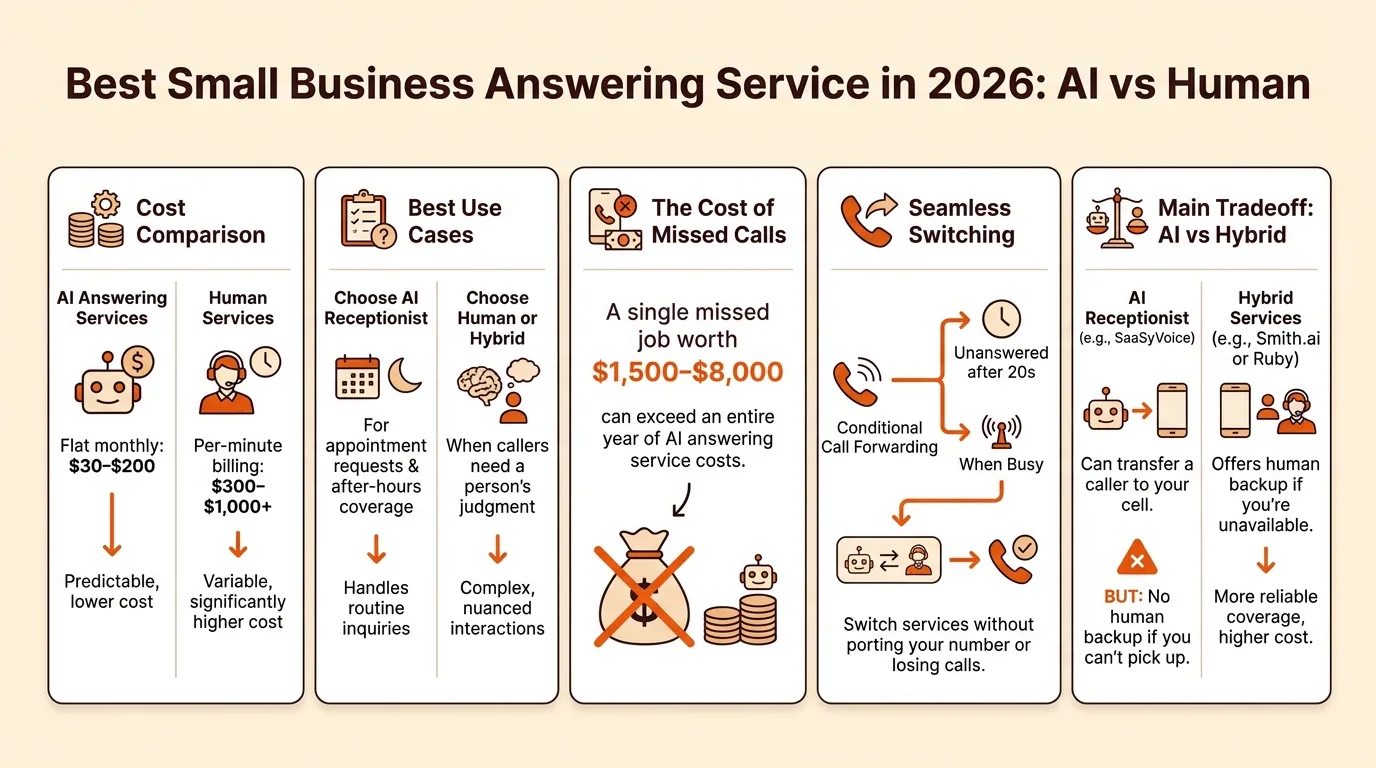
- AI answering services run roughly $30–$200 per month flat, while human services typically cost $300–$1,000+ with per-minute billing.
- Choose an AI receptionist for appointment requests and after-hours coverage; choose a human or hybrid service when callers need a person's judgment.
- A single missed job worth $1,500–$8,000 can exceed an entire year of AI answering service costs.
- Use conditional call forwarding (unanswered after 20 seconds or when busy) to switch services without porting your number or losing calls.
- An AI receptionist like SaaSyVoice can transfer a caller to your cell, but there's no human backup if you can't pick up, which is the main tradeoff versus hybrid services like Smith.ai or Ruby.
The best small business answering service for a solo trade owner in 2026 is an AI receptionist if you miss calls mostly after hours and want flat-rate pricing, a hybrid service if you want a human backup during the day, and a human team if your callers demand judgment. This guide scores real services on pricing, transfer capability, setup time, and after-hours coverage, then gives you a framework to match one to your call volume.
best small business answering service
The best small business answering service depends on who picks up: Smith.ai and Ruby Receptionists use trained humans, PATLive uses live agents too, Goodcall and Rosie are AI receptionists, and SaaSyVoice builds an AI receptionist from your website in about a minute that answers 24/7 and books appointments. If you're a solo plumber or HVAC tech who can't stop a job to grab the phone, AI wins on cost and after-hours coverage. If you bill five-figure jobs and need judgment on the line, pay for humans. Home-services owners can start with our vertical setup for plumbers.
What should a small business answering service actually include?
Judge any service, human or AI, on five measurable criteria: pricing model, transfer capability, message delivery speed, booking, and setup time. If a provider can't give you a straight answer on all five, keep shopping.
Pricing model: per-minute vs per-call vs flat-rate
Per-minute billing punishes you for long calls. Per-call pricing is predictable unless you get hang-ups billed as calls. Flat-rate or unlimited-minutes plans cost more monthly but remove the meter entirely. Match the model to your call volume: low and unpredictable favors per-call, steady volume favors flat-rate.
Warm transfer vs message-taking
Message-taking means you still call back, usually hours later, after the caller has booked someone else. A warm transfer hands an urgent job to your cell while the caller is still on the line. Ask exactly how urgent calls reach you, because "we'll email you a summary" is not a transfer.
Setup time and porting your number
Setup should take minutes, not an onboarding week. AI services like ours build your receptionist from your website in about a minute, while human services typically need training time. Check whether you must port your number or can forward to a new one. The same criteria apply to any niche service, whether it's an AI answering service for restaurants or one built for trades.
How much does a small business answering service cost per month?
Short answer: roughly $30–$200 per month for AI, $100–$400 for hybrid, and $300–$1,000+ for a human team, though exact figures vary by plan and usage. What drives the bill is almost always minutes or calls, not the base plan. Human services like Smith.ai bill on usage, so a busy season means a bigger invoice. AI services tend toward flat rates: SaaSyVoice runs $29–$449 per month, and you can see how that maps to an HVAC shop on our HVAC answering service page.
| Model | Typical monthly range | Billing driver |
|---|---|---|
| AI receptionist | $30–$200 flat | Flat rate, sometimes per unique caller |
| Hybrid (AI + human) | $100–$400 | Per minute or per call |
| Human service | $300–$1,000+ | Per minute, plus plan minimums |
Ranges are illustrative; always check current pricing pages.
Hidden costs that blow up the bill
Watch for overage rates: go past your plan's minutes and the per-minute price often jumps. Per-minute billing also punishes hold time and small talk, so a two-minute call costs double a one-minute one. Some plans charge per unique caller instead, which rewards repeat customers but bills new callers more. Ask what happens after hours and on holidays before you sign, because that coverage is frequently a paid add-on.
Human vs hybrid vs AI: which model fits your call volume?
Pick by volume and call type, not brand loyalty. Under about 40 calls a week, mostly appointment requests and after-hours overflow, an AI receptionist covers you for a flat monthly fee and answers every unique caller in seconds. That is the model we built SaaSyVoice around: read from your website, book appointments, and never put a caller on hold.
Human services like Ruby Receptionists and Smith.ai earn their usage-based pricing when calls are complex: emergency triage, upset customers, or callers who need judgment mid-conversation. If a single booked job is worth $2,000+, paying a human $1-3 per minute to handle it well is cheap insurance. Hybrid models split the difference: AI takes the routine and after-hours load, humans take warm transfers and edge cases.
Three questions decide it. First, how many calls do you actually miss, and when? Second, do callers need empathy or just an open slot on the calendar? Third, what does a lost job cost you versus a month of service? A caterer juggling event-date inquiries has different math than an HVAC tech on a ladder, which is why we also built a dedicated page for AI answering for caterers.
The 2026 comparison: best small business answering services scored
We scored Smith.ai, Ruby, Goodcall, PATLive, Rosie, and SaaSyVoice on five criteria: pricing model, warm transfer vs message-only, setup time, after-hours coverage, and whether a human ever picks up.
Smith.ai and Ruby: human and hybrid options
Smith.ai and Ruby both put trained receptionists on the line, which matters when a caller is mid-emergency and needs reassurance, not a transcript. The tradeoff is cost: human time is priced per minute or per call, so a busy season gets expensive, and onboarding takes days because the service has to learn your business. Both handle after-hours coverage, but you are paying staff wages around the clock, which is why their entry tiers run higher than AI tools. PATLive works the same way, with live agents on monthly minute bundles.
Goodcall, Rosie, and SaaSyVoice: AI options
Goodcall, Rosie, and SaaSyVoice answer in seconds at any hour, and setup is measured in minutes because the AI builds from your website. Callers who reach voicemail often hang up and call the next business on the list, which is exactly the gap a fast AI answer closes. Here is the honest scoring pass, ours included. SaaSyVoice builds your receptionist from your website in about a minute, answers 24/7, speaks the caller's language, and books the appointment, with flat-rate tiers from $29 to $449 instead of per-minute billing. That flat rate is the point: a human service bills you more in your busiest month, when you can least afford it, while a flat plan has no per-minute overage, so a busy month never brings a surprise bill. A human on the line is where the model splits.
Smith.ai and Ruby put a trained person on the line who can calm a caller before handing an emergency to your cell. SaaSyVoice can transfer a caller to your cell too, or take a message, book the job and email you the summary, but if you can't pick up, no person steps in. If your calls are appointment requests, quote requests, and "are you open right now," AI wins on speed and cost. If a caller needs judgment before you will commit a truck, pay for the human. We built our answering service for the first caller, and we say so plainly.

Where AI answering services fall short (including ours)
AI answering services handle routine calls well: hours, directions, "can you quote a water heater?" They struggle with three situations. First, complex intake, like an HVAC caller describing an intermittent fault across three visits. Second, emotional callers, such as a homeowner with a burst pipe at 2 a.m. who wants a human voice, not a calm synthetic one. Third, liability-sensitive calls, where a wrong answer about electrical work or a gas leak creates real risk.
SaaSyVoice has the same limits. It can transfer a caller to your cell, but there is no human receptionist behind ours, so if you can't pick up, nobody else will. If your callers regularly need judgment calls or reassurance, a hybrid service like Smith.ai or Ruby Receptionists fits better. Choose AI for volume and after-hours coverage; choose humans where empathy and escalation matter.
What does a missed call actually cost a trade business?
An HVAC tech on a ladder can't answer the phone, and a caller who reaches voicemail often dials the next listing instead of waiting for a callback.
Now run your own math. A single replacement install or emergency repair call is often worth $1,500 to $8,000 depending on the trade and the job. If you miss even one such call a month, that lost job likely exceeds the entire monthly cost of an answering service, including AI receptionist plans like SaaSyVoice's, which run $29 to $449 a month.
Missed calls skew toward after-hours and on-the-job hours, which is precisely when your customers call. One recovered job pays for the service; the rest is margin.
How to switch to an answering service without losing calls
Send your main number's calls to the service with conditional forwarding, not full forwarding: set "forward when unanswered after 20 seconds" or "forward when busy" so a dropped call from a ladder still reaches the receptionist.
Test it before you trust it. From a second phone, let your cell ring out and confirm the service picks up, books a test job, and emails you the call summary. Then call after-hours and repeat.
One-week rollout: day 1, set up forwarding rules; day 2, run five test calls including one busy-line test; day 3, load your service area and job types; day 4, go live during work hours only; day 5, add after-hours; days 6-7, review every message and booking for accuracy, then adjust greetings or routing. Keep your old voicemail on for a month as a backstop.
FAQ
Do answering services answer calls 24/7 or only after hours?
Most offer both. Human services like Smith.ai and Ruby cover after hours, but you pay staff wages around the clock, so entry tiers run higher. AI receptionists answer in seconds at any hour as standard, which suits solo trade owners whose missed calls cluster after hours and while they are on a job.
Will callers know they're talking to an AI receptionist?
Usually yes, and honesty works in your favor. A well-built AI receptionist answers quickly, reads from your website, and books the job, so most routine callers care about speed, not the voice. The exception is an emotional caller, like a homeowner with a burst pipe at 2 a.m., who may want a human. If that describes your callers, choose a hybrid or human service.
Can an answering service book appointments directly into my calendar?
Many AI receptionists can, including SaaSyVoice, which books appointments as part of the call instead of just taking a message. Human services typically capture details and send them to you, meaning you still confirm the slot yourself. Ask any provider exactly where bookings land and how fast you see them before you sign up.
Is a per-minute plan or flat-rate plan cheaper for a low call volume?
Per-minute or per-call pricing is usually cheaper at low, unpredictable volume, because you only pay for what arrives. Flat-rate plans cost more monthly but remove the meter entirely, which wins once volume is steady. A flat rate also protects your busiest month, when per-minute billing from a human service gets most expensive.
Do I need a new phone number to use an answering service?
No. Most services let you forward your existing number rather than port it, so callers see the number they already know. Use conditional forwarding, such as "forward when unanswered after 20 seconds" or "forward when busy," instead of full forwarding. Check the provider's setup requirements first, because porting rules differ between services.